***
title: Predefined strategy types
'og:site\_name': Unleash Documentation
'og:title': Predefined strategy types - Legacy activation strategy implementations
description: >-
Predefined strategy types are a legacy implementation. Use the default
strategy with strategy constraints to achieve your desired targeting.
keywords: >-
predefined strategies, legacy, gradual rollout, user id, session id,
deprecated
max-toc-depth: 3
----------------
Predefined strategy types are a legacy implementation. Please use the [default strategy](/concepts/activation-strategies) with strategy constraints to achieve your desired targeting.
## UserIDs
The `userWithId` strategy was removed in Unleash v7.0.0 for new installations. Instead use a gradual rollout strategy with a user ID stickiness and constraints.
The `userWithId` strategy is active for users with a `userId` defined in the `userIds` list.
**Parameters:**
* userIds - *List of user IDs you want the feature flag to be enabled for*
## Flexible Gradual Rollout
The `flexibleRollout` stategy has the following parameters:
* stickiness - Used to define how we guarantee consistency for a gradual rollout. The same userId and the same rollout percentage should give predictable results. Configuration that should be supported:
* default - Unleash chooses the first value present on the context in defined order userId, sessionId, random.
* userId - Guaranteed to be sticky on userId. If userId not present the behavior would be false
* sessionId - Guaranteed to be sticky on sessionId. If sessionId not present the behavior would be false.
* random - No stickiness guaranteed. For every isEnabled call it will yield a random true/false based on the selected rollout percentage.
* groupId - Used to ensure that different flags will **hash differently** for the same user. The groupId defaults to *feature flag name*, but the user can override it to *correlate rollout* of multiple feature flags.
* rollout - The percentage (0-100) you want to enable the feature flag for.
### Gradual rollout with user ID
The `gradualRolloutUserId` strategy gradually activates a feature flag for logged-in users. Stickiness is based on the user ID. The strategy guarantees that the same user gets the same experience every time across devices. It also assures that a user which is among the first 10% will also be among the first 20% of the users. That way, we ensure the users get the same experience, even if we gradually increase the number of users exposed to a particular feature. To achieve this, we hash the user ID and normalize the hash value to a number between 1 and 100 with a simple modulo operator.
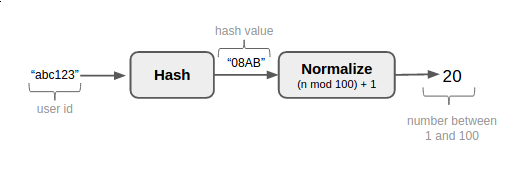
Starting from v3.x all clients should use the 32-bit [MurmurHash3](https://en.wikipedia.org/wiki/MurmurHash) algorithm to normalize values. ([issue 247](https://github.com/Unleash/unleash/issues/247))
**Parameters:**
* percentage - The percentage (0-100) you want to enable the feature flag for.
* groupId - Used to define an activation group, which allows you to correlate rollout across feature flags.
### Gradual rollout with session ID
Similar to `gradualRolloutUserId` strategy, this strategy gradually activates a feature flag, with the exception being that the stickiness is based on the session IDs.
**Parameters:**
* percentage - The percentage (0-100) you want to enable the feature flag for.
* groupId - Used to define an activation group, which allows you to correlate rollout across feature flags.
### Random gradual rollout
The `gradualRolloutRandom` strategy randomly activates a feature flag and has no stickiness. We have found this rollout strategy very useful in some scenarios, especially when we enable a feature which is not visible to the user. It is also the strategy we use to sample metrics and error reports.
**Parameters:**
* percentage - The percentage (0-100) you want to enable the feature flag for.