***
title: 11 principles for building and scaling feature flag systems
description: >-
Build a scalable, secure feature flag system with 11 key principles. Improve
DevOps metrics, ensure reliability, and enhance developer experience.
keywords: 'principles, building, scaling, feature flags, unleash'
'og:site\_name': Unleash Documentation
'og:title': 11 principles for building and scaling feature flag systems
max-toc-depth: 2
----------------
Feature flags, [sometimes called feature toggles or feature switches](/get-started/what-is-a-feature-flag), are a powerful software development technique that allows engineering teams to decouple the release of new functionality from software deployments.
With feature flags, developers can turn [specific features or code segments on or off at runtime](https://www.getunleash.io/feature-flag-use-cases-software-kill-switches) without needing a code deployment or rollback. Organizations that adopt feature flags see improvements in key [DevOps metrics](https://www.getunleash.io/blog/dora-metrics-in-2023-5-ways-to-measure-devops-performance) like lead time to changes, mean time to recovery, deployment frequency, and change failure rate.
At Unleash, we've defined 11 principles for building a large-scale feature flag system. These principles have their roots in distributed systems design and focus on security, privacy, and scalability—critical needs for enterprise systems. By following these principles, you can create a feature flag system that's reliable, easy to maintain, and capable of handling heavy loads.
These principles are:
1. [Enable runtime control](#1-enable-runtime-control)
2. [Make flags short-lived](#2-make-flags-short-lived)
3. [Prioritize availability over consistency](#3-prioritize-availability-over-consistency)
4. [Ensure unique flag names](#4-ensure-unique-flag-names)
5. [Choose open by default](#5-choose-open-by-default)
6. [Protect PII by evaluating flags server-side](#6-protect-pii-by-evaluating-flags-server-side)
7. [Evaluate flags as close to the user as possible](#7-evaluate-flags-as-close-to-the-user-as-possible)
8. [Scale horizontally by decoupling reads and writes](#8-scale-horizontally-by-decoupling-reads-and-writes)
9. [Limit feature flag payload](#9-limit-feature-flag-payload)
10. [Prioritize consistent user experience](#10-prioritize-consistent-user-experience)
11. [Optimize for developer experience](#11-optimize-for-developer-experience)
Let's dive deeper into each principle.
## 1. Enable runtime control
A scalable feature management system evaluates flags at runtime. Flags are dynamic, not static. If you need to restart your application to turn on a flag, that's configuration, not a feature flag.
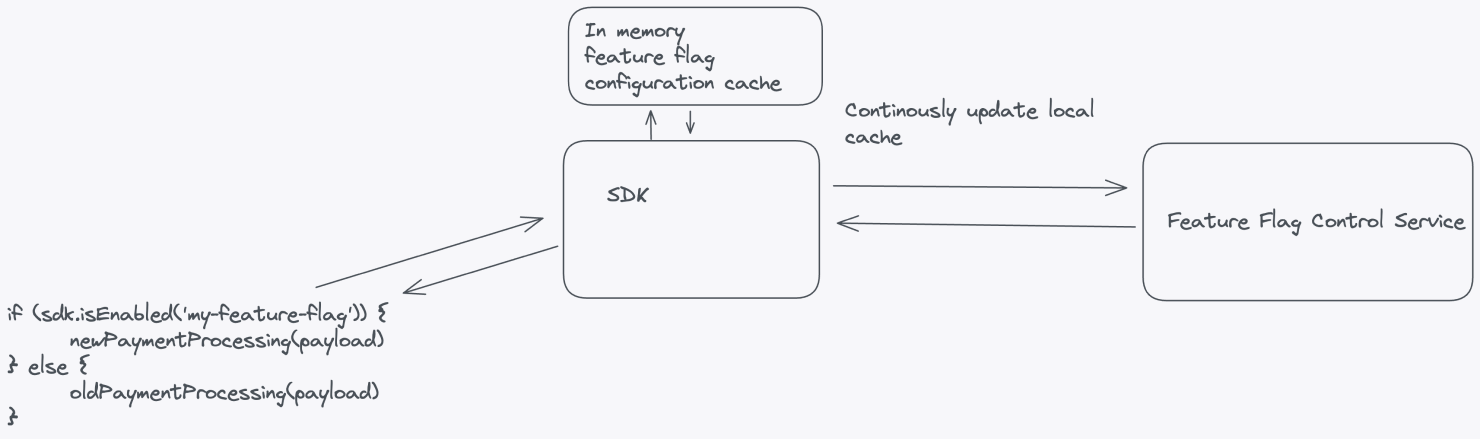
A large-scale feature flag system that enables [runtime control](https://www.getunleash.io/blog/so-what-exactly-is-runtime-control) should have, at minimum, the following components: a [service to manage feature flags](https://www.getunleash.io/blog/feature-management), a database or data store, an [API layer](/get-started/unleash-overview), a [feature flag SDK](/sdks), and a continuous update mechanism.
Let's break down these components.
### Feature flag system components
* **Feature Flag Control Service**: A [service that acts as the control plane for your feature flags](https://www.getunleash.io/feature-flag-service), managing all flag configurations. The scope of this service should reflect the boundaries of your organization.
* **Database or data store**: A robust, scalable, and highly available database or data store that stores feature flag configurations reliably. Common options include SQL databases, NoSQL databases, or key-value stores.
* **API layer**: An API layer that exposes endpoints for your application to interact with the *Feature Flag Control Service*. [This API should allow your application to request feature flag configurations](/get-started/unleash-overview).
* **Feature flag SDK**: [An easy-to-use interface for fetching flag configurations and evaluating feature flags at runtime](/sdks). When considering feature flags in your application, the call to the SDK should query the local cache, and the SDK should ask the central service for updates in the background.
* **Continuous update mechanism**: An update mechanism that enables [dynamic updates to feature flag configurations](/get-started/unleash-overview) without requiring application restarts or redeployments. The SDK should handle subscriptions or polling to the *Feature Flag Control Service* for updates.
## 2. Make flags short-lived
The most common use case for feature flags is to manage the [rollout](https://www.getunleash.io/feature-flag-use-cases-progressive-or-gradual-rollouts) of new functionality. Once a rollout is complete, you should remove the feature flag from your code and archive it. Remove any old code paths that the new functionality replaces.
Avoid using feature flags for static application configuration. Application configuration should be consistent, long-lived, and loaded during application startup. In contrast, [feature flags should be short-lived, dynamic, and updated at runtime](/guides/best-practices-using-feature-flags-at-scale). They prioritize availability over consistency and can be modified frequently.
Configuration system
Feature flag system
Lifetime and runtime behavior
Long-lived, static during runtime
Short-lived, changes during runtime
Example use cases
Database or server credentials
Server port
CORS headers
API base URL
[A/B or multivariate testing](https://www.getunleash.io/blog/ab-testing-feature-flags-how-to)
### Strategies for large organizations implementing feature flags
To succeed with feature flags in a large organization, [follow these strategies](/guides/best-practices-using-feature-flags-at-scale):
* **Set flag expiration dates**: Assign expiration dates to feature flags to track which flags are no longer needed. A good feature flag management tool will alert you to expired flags, making it easier to maintain your codebase.
* **Treat feature flags like technical debt**: Incorporate tasks to remove outdated feature flags into your sprint or project planning, just as you would with [technical debt](/concepts/technical-debt). Feature flags add complexity to your code by introducing multiple code paths that need context and maintenance. If you don't clean up feature flags in a timely manner, you risk losing the context as time passes or personnel changes, making them harder to manage or remove.
* **Archive old flags**: When feature flags are no longer in use, archive them after removing them from the codebase. This archive serves as an important audit log of feature flags and allows you to revive flags if you need to restore an older version of your application.
While most feature flags should be short-lived, there are valid exceptions for long-lived flags, including:
* **Kill switches**: [Kill switches](https://www.getunleash.io/blog/kill-switches-best-practice) act as inverted feature flags, allowing you to gracefully disable parts of a system with known weak spots.
* **Internal flags**: Internal flags to enable additional debugging, tracing, and metrics at runtime, which are too costly to run continuously. Engineers can enable these flags while debugging issues.
## 3. Prioritize availability over consistency
Your application shouldn't have any dependency on the availability of your feature flag system. Robust feature flag systems avoid relying on real-time flag evaluations because the unavailability of the feature flag system will cause application downtime, outages, degraded performance, or even a complete failure of your application.
If the feature flag system fails, your application should continue running smoothly. Feature flagging should degrade gracefully, preventing any unexpected behavior or disruptions for users.
You can implement the following strategies to achieve a resilient architecture:
* **Bootstrap SDKs with data**: Feature flagging SDKs should work with locally cached data, even when the network connection to the *Feature Flag Control Service* is unavailable, using the last known configuration or defaults to ensure uninterrupted functionality.
* **Use local cache**: Maintaining a local cache of feature flag configurations helps reduce network round trips and dependency on external services. The local cache can periodically synchronize with the central *Feature Flag Control Service* when it's available.
* **Evaluate feature flags locally**: Whenever possible, the SDKs or application components should evaluate feature flags locally without relying on external services, ensuring uninterrupted feature flag evaluations even if the feature flagging service is down.
* **Prioritize availability over consistency**: In line with the [CAP theorem](https://www.ibm.com/topics/cap-theorem), design for availability over strict consistency. In the face of network partitions or downtime of external services, your application should favor maintaining its availability rather than enforcing perfectly consistent feature flag configuration caches. Eventually consistent systems can tolerate temporary inconsistencies in flag evaluations without compromising availability.
## 4. Ensure unique flag names
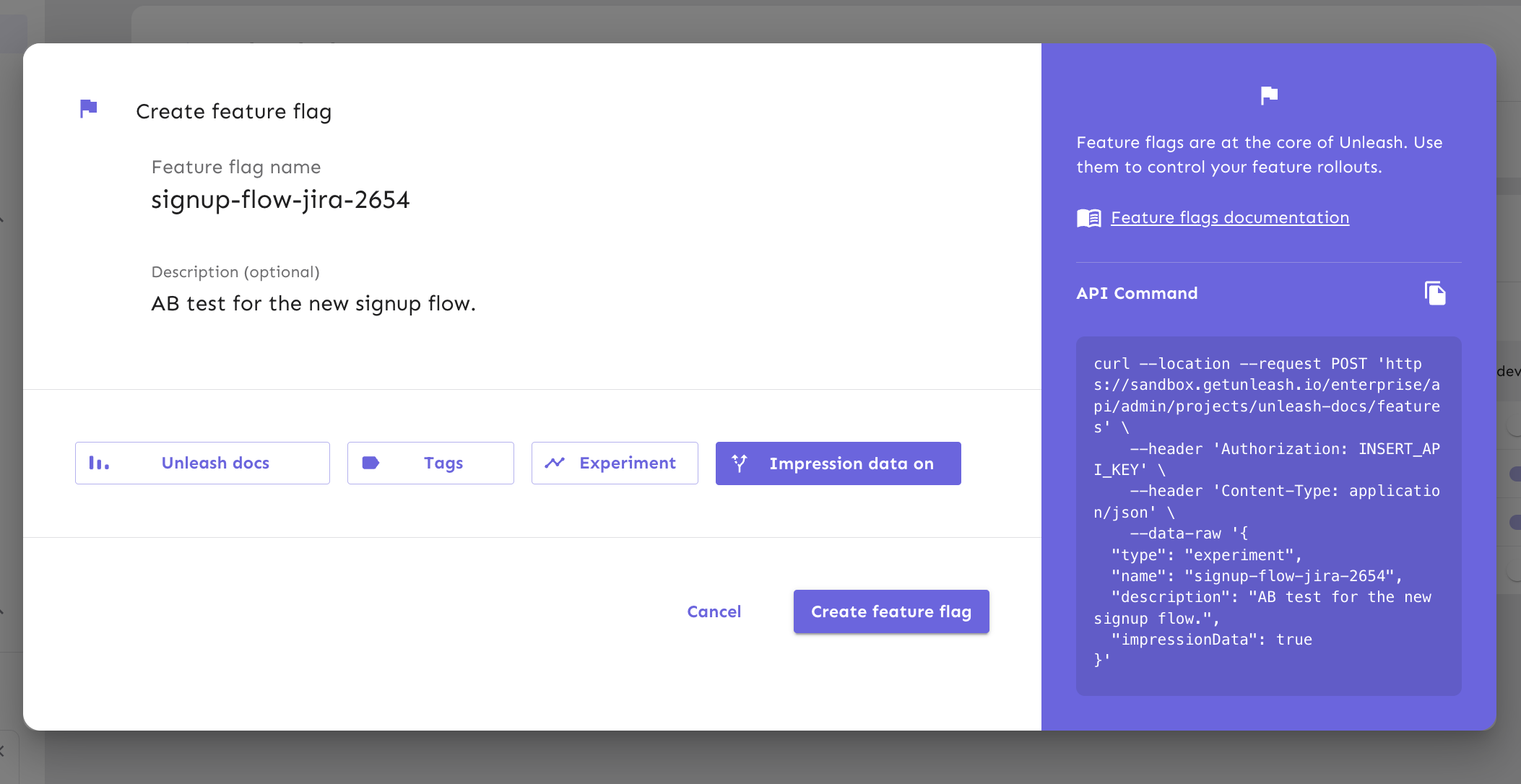
Ensure that all flags within the same *Feature Flag Control Service* have unique names across your entire system. [Unique naming](/guides/best-practices-using-feature-flags-at-scale#reusing-feature-flag-names) prevents the reuse of old flag names, reducing the risk of accidentally re-enabling outdated features with the same name.
### The benefits of unique naming
Unique naming has the following advantages:
* **Flexibility over time**: Large enterprise systems are not static. Monoliths may split into microservices, microservices may merge, and applications change responsibility. Unique flag naming across your organization means that you can reorganize your flags to match the changing needs of your organization.
* **Fewer conflicts**: If two applications use the same feature flag name, it can become difficult to identify which flag controls which application. Even with separate namespaces, you risk toggling the wrong flag, leading to unexpected consequences.
* **Easier flag management**: Unique names make it simpler to track and identify feature flags. Searching across codebases becomes more straightforward, and it's easier to understand a flag's purpose and usage.
* **Improved collaboration**: A feature flag with a unique name in the organization simplifies collaboration across teams, products, and applications, ensuring that everyone refers to the same feature.
## 5. Choose open by default
Making feature flag systems open by default enables engineers, product owners, and support teams to collaborate effectively and make informed decisions. Open access encourages productive discussions about feature releases, experiments, and their impact on the user experience.
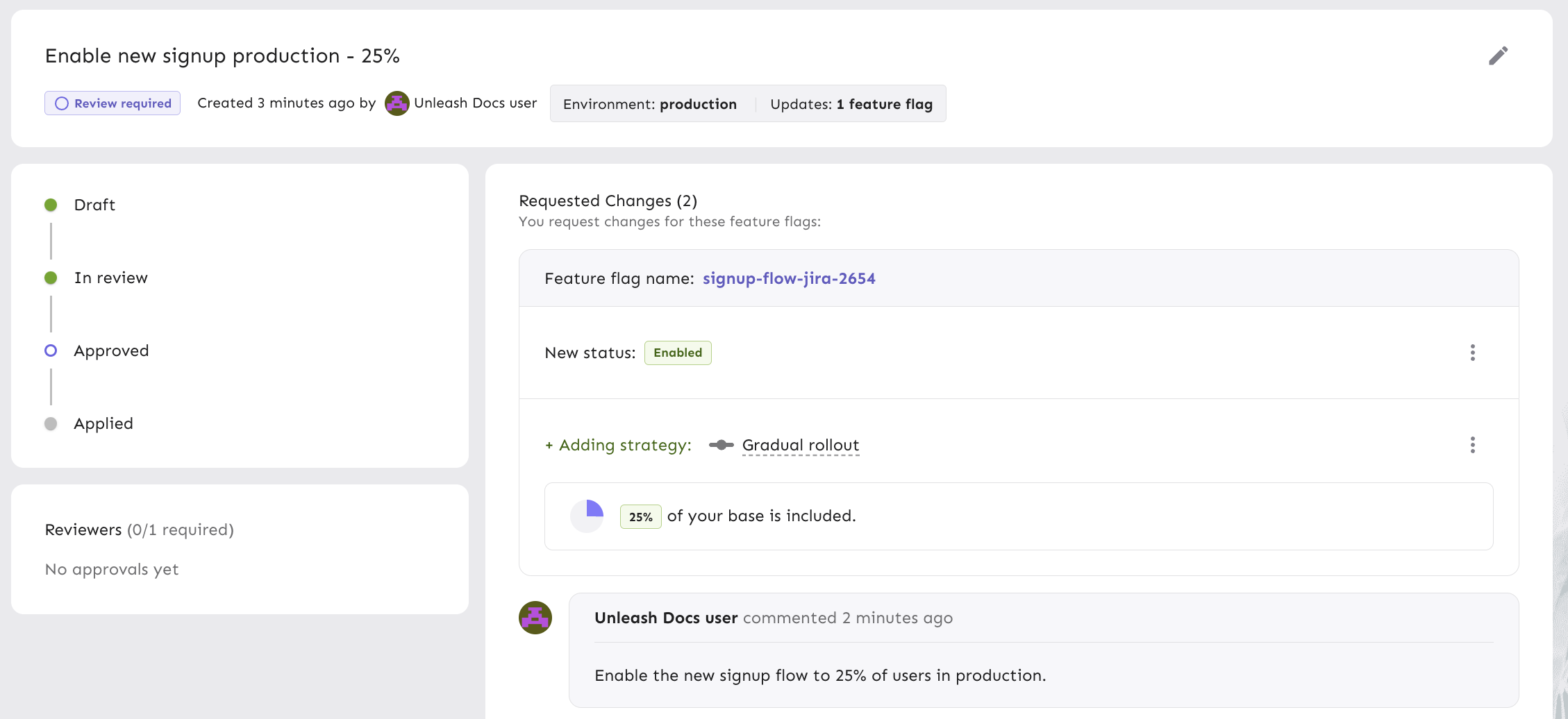
[Access control and visibility](/guides/user-management-access-controls) are also key considerations for [security and compliance](https://www.getunleash.io/security-and-performance). Tracking and auditing feature flag changes help maintain data integrity and meet regulatory requirements. While open access is key, it's equally important to integrate with corporate access controls, such as SSO, to ensure security. In some cases, additional controls like feature flag approvals using the [four-eyes principle](/concepts/change-requests) are necessary for critical changes.
### Open collaboration strategies for feature flag management
For open collaboration, consider providing the following:
* **Access to the codebase**: Engineers need direct access to the codebase that contains the feature flags. This allows them to quickly diagnose and fix issues, minimizing downtime and performance problems.
* **Access to configuration**: Engineers, product owners, and even technical support should be able to view feature flag configuration. This transparency provides insights into which features are currently active, what conditions trigger them, and how they impact the application's behavior. Product owners can also make real-time decisions on feature rollouts or adjustments without relying solely on engineering resources.
* **Access to analytics**: Both engineers and product owners should be able to correlate feature flag changes with production metrics. This helps assess how flags impact user behavior, performance, and system health, enabling data-driven decisions for feature rollouts, optimizations, or rollbacks.
## 6. Protect PII by evaluating flags server-side
Feature flags often require contextual data for accurate evaluation, which could include sensitive information such as user IDs, email addresses, or geographical locations. To safeguard this data, follow the data security [principle of least privilege (PoLP)](https://www.cyberark.com/what-is/least-privilege), ensuring that all [Personally Identifiable Information (PII)](https://www.investopedia.com/terms/p/personally-identifiable-information-pii.asp) remains confined to your application.
To implement the principle of least privilege, ensure that your *Feature Flag Control Service* only handles the configuration for your feature flags and passes this configuration down to the SDKs connecting from your applications.
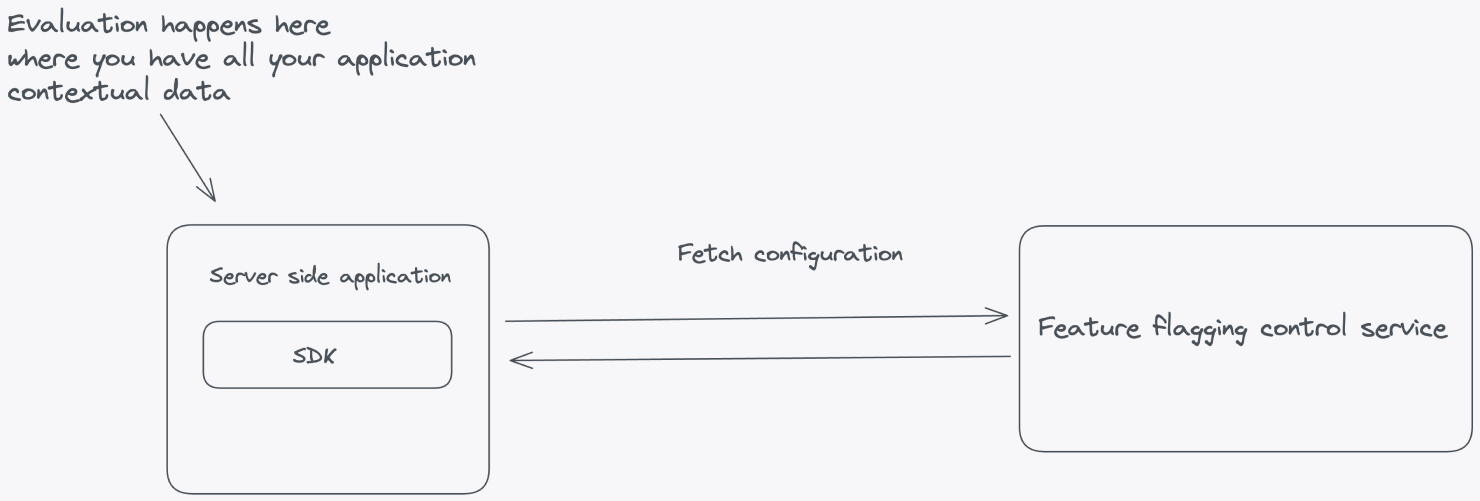
Let's look at an example where feature flag evaluation happens inside the server-side application. This is where all the contextual application data lives. The flag configuration—all the information needed to evaluate the flags—is fetched from the *Feature Flag Control Service*.
Client-side applications where the code resides on the user's machine in browsers or mobile devices, require a different approach. You can't evaluate flags on the client side because it raises significant security concerns by exposing potentially sensitive information such as API keys, flag data, and flag configurations. Placing these critical elements on the client side increases the risk of unauthorized access, tampering, or data breaches.
### Evaluate within a self-hosted environment
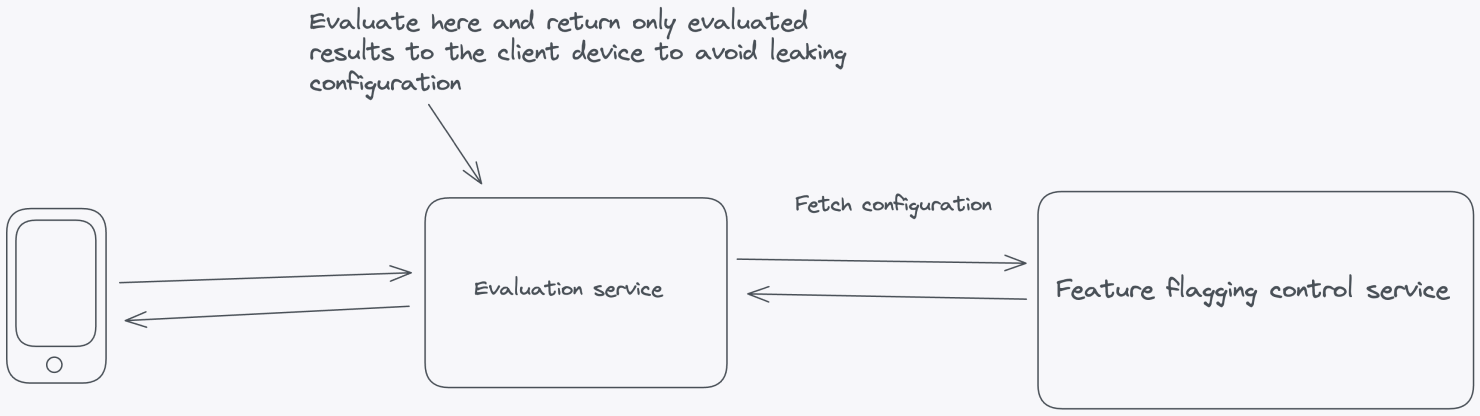
Instead of performing client-side evaluation, a more secure and maintainable approach is to evaluate feature flags within a self-hosted environment. Doing so can safeguard sensitive elements like API keys and flag configurations from potential client-side exposure. This strategy involves a server-side evaluation of feature flags, where the server makes decisions based on user and application parameters and then securely passes down the evaluated results to the frontend without any configuration leaking.
### Server-side components
In [Principle 1](#1-enable-runtime-control), we proposed a set of architectural components for building a feature flag system. The same principles apply here, with additional suggestions for achieving local evaluation. For client-side setups, use a dedicated evaluation server that can evaluate feature flags and pass evaluated results to the frontend SDK.
### SDKs
[SDKs](/sdks) make it more convenient to work with feature flags. Depending on the context of your infrastructure, you need different types of SDKs to talk to your feature flagging service. Backend SDKs should fetch configurations from the *Feature Flag Control Service* and evaluate flags locally using the application's context, reducing the need for frequent network calls.
For frontend applications, SDKs should send the context to an evaluation server and receive the evaluated results. The evaluated results are then cached in memory in the client-side application, allowing quick lookups without additional network overhead. This provides the performance benefits of local evaluation while minimizing the exposure of sensitive data.
## 7. Evaluate flags as close to the user as possible
For optimal performance, you should evaluate feature flags as close to your users as possible. Building on the server-side evaluation approach from [Principle 2](#6-protect-pii-by-evaluating-flags-server-side), let's look at how evaluating flags locally can bring key benefits in terms of performance, cost, and reliability:
* **Reduced latency**: Network roundtrips introduce latency, slowing your application's response time. Local evaluation eliminates the need for these roundtrips, resulting in faster feature flag decisions. This makes your application more responsive thereby improving the user experience.
* **Offline functionality**: Many applications need to function offline or in low-connectivity environments. Local evaluation ensures feature flags are still functional, even without an active network connection. This is especially important for mobile apps or services in remote locations.
* **Reduced bandwidth costs**: Local evaluation reduces the amount of data transferred between your application and the feature flag service. This can lead to significant cost savings, particularly if you have a large user base or high traffic volume.
* **Ease of development and testing**: Developers can continue their work in environments where a network connection to the feature flag service might be unstable or unavailable. Local evaluation allows teams to work on feature flag-related code without needing constant access to the service, streamlining the development process.
* **Resilience during service downtime**: If the feature flag service experiences downtime or outages, local evaluation allows your application to continue functioning without interruptions. This is important for maintaining service reliability and ensuring your application remains available even when the service is down.
In summary, this principle emphasizes optimizing performance while protecting end-user privacy by evaluating feature flags as close to the end user as possible. This also leads to a highly available feature flag system that scales with your applications.
## 8. Scale horizontally by decoupling reads and writes
When designing a scalable feature flag system, one of the most effective strategies is to separate read and write operations into distinct APIs. This architectural decision not only allows you to scale each component independently but also provides better performance, reliability, and control.
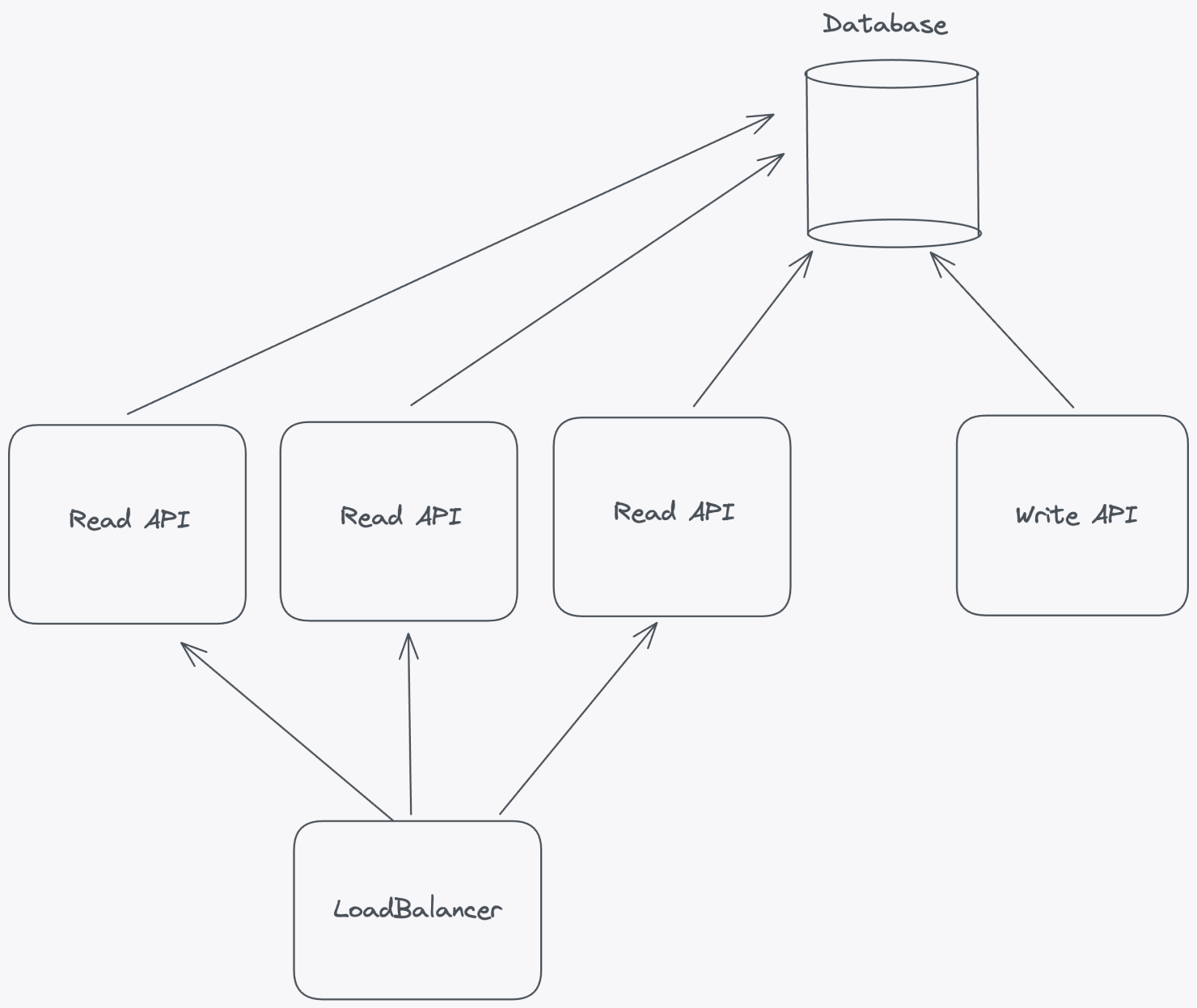
By decoupling read and write operations, you gain the flexibility to scale horizontally based on the unique demands of your application. For example, if read traffic increases, you can add more servers or containers to handle the load without needing to scale the write operations.
### The benefits of decoupling
The benefits of decoupling read and write operations extend beyond just scalability; let's look at a few others:
* **More efficient caching**: You can optimize your flag caching for read operations to reduce latency while keeping write operations consistent.
* **Granular access control**: You can apply different security measures and access controls to the two APIs, reducing the risk of accidental or unauthorized changes.
* **Improved monitoring and troubleshooting**: Monitoring and troubleshooting become more straightforward. It's easier to track and analyze the performance of each API independently. When issues arise, you can isolate the source of the problem more quickly and apply targeted fixes or optimizations.
* **Flexibility and maintenance**: Updates to one API won't directly impact the other, reducing the risk of unintended consequences. This separation of concerns allows development teams to work on each API separately, facilitating parallel development and deployment cycles.
* **Distributed traffic**: You can tailor load-balancing strategies to the specific needs of the read and write APIs. You can distribute traffic and resources accordingly to optimize performance and ensure that neither API becomes a bottleneck under heavy load.
## 9. Limit feature flag payload
Minimizing the size of feature flag payloads is a critical aspect of maintaining the efficiency and performance of a feature flag system. Payload size can vary based on targeting rule complexity. For example, targeting based on individual user IDs may work with small user bases but becomes inefficient as the user base grows.
Avoid storing large user lists directly in the feature flag configuration, which can lead to scaling issues. Instead, categorize users into logical groups at a higher layer (for example, by subscription plan or location) and use group identifiers for targeting within the feature flag system.
### The benefits of small payloads
Keeping the feature flag payload small results in:
* **Reduced network load**: Large payloads can lead to increased network traffic between the application and the feature flagging service. This can overwhelm the network and cause bottlenecks, leading to slow response times and degraded system performance. Even small optimizations can make a big difference at scale.
* **Faster flag evaluation**: Smaller payloads mean faster data transmission and flag evaluation, crucial for real-time decisions that affect user experience.
* **Improved memory efficiency**: Feature flagging systems often store flag configurations in memory for quick access during runtime. Larger payloads consume more memory, potentially causing memory exhaustion and system crashes. Limiting payloads ensures that the system remains memory-efficient, reducing the risk of resource-related issues.
* **Better scalability**: Smaller payloads require fewer resources, making it easier to scale your system as your application grows.
* **Lower infrastructure costs**: Optimized payloads reduce infrastructure needs and costs while simplifying system management.
* **Improved system reliability**: Delivering smaller, more manageable payloads minimizes the risk of network timeouts and failures.
* **Ease of monitoring and debugging**: Smaller payloads are easier to monitor and debug, making issue resolution faster.
For more insights into reducing payload size, visit our [Best practices for using feature flags at scale](/guides/best-practices-using-feature-flags-at-scale#using-large-targeting-lists) guide.
## 10. Prioritize consistent user experience
Feature flagging solutions are indispensable tools in modern software development, enabling teams to manage feature releases and experiment with new functionality. However, one aspect that is absolutely non-negotiable in any feature flag solution is the need to ensure a consistent user experience. Feature flagging solutions must prioritize consistency and guarantee the same user experience every time, especially with percentage-based gradual rollouts.
### Strategies for consistency in percentage-based gradual rollouts
* **User hashing**: Assign users to consistent groups using a secure hashing algorithm based on unique identifiers like user IDs or emails. This ensures that the same user consistently falls into the same group.
* **Segmentation control**: Provide controls within the feature flagging tool to allow developers to [segment](/concepts/segments) users logically by criteria like location, subscription type, or other relevant factors, ensuring similar experiences for users within the same segment.
* **Fallback mechanisms**: Include fallback mechanisms in your architecture. If a user encounters issues or inconsistencies, the system should automatically switch them to a stable version or feature state.
* **Logging and monitoring**: Implement robust logging and monitoring. Continuously track which users are in which groups and what version of the feature they are experiencing. Monitor for anomalies or deviations and consider building automated processes to disable features that may be misbehaving.
* **Transparent communication**: Clearly communicate gradual rollouts through in-app notifications, tooltips, or changelogs, so users are informed about changes and know what to expect.
## 11. Optimize for developer experience
[Developer experience](https://www.opslevel.com/resources/devex-series-part-1-what-is-devex) is a critical factor to consider when implementing a feature flag solution. A positive developer experience enhances the efficiency of the development process and contributes to the overall success and effectiveness of feature flagging. One key aspect of developer experience is ensuring the testability of the SDK and providing tools for developers to understand how and why feature flags are evaluated.
### Developer experience strategies for feature flags
To ensure a good developer experience, you should provide the following:
* **Simplified testing and debugging**: A testable SDK enables developers to quickly test and iterate on features, speeding up development cycles. Developers can toggle flags, simulate conditions, and observe results without significant code changes or redeployments. This makes it easier to identify and fix issues by examining flag configurations and logging decisions.
* **Visibility into flag behavior**: Developers need tools to understand how feature flags impact the user experience. Visibility into flag behavior helps them assess changes, debug effectively with multiple inputs, and collaborate more easily within cross-functional teams.
* **Effective monitoring**: A testable SDK should support real-time monitoring of flag performance, tracking metrics like evaluations, user engagement, and feature impact. Developers can use this data to evaluate the success of new features, conduct A/B tests, and make informed decisions about optimizations.
* **Usage metrics**: Provide aggregated insights into feature flag usage, helping developers confirm that everything is working as expected.
* **Documentation and training**: Offer clear, comprehensive documentation for the API, UI, and SDKs, with easy-to-follow examples. This simplifies onboarding for new developers and supports continuous training, ensuring the effective use of the feature flagging system.
***
## Additional resources
Thank you for reading. Our motivation for writing these principles is to share what we've learned building a [large-scale feature flag solution](https://www.getunleash.io/enterprise-feature-management-platform) with other architects and engineers solving similar challenges. [Unleash is open-source](https://www.getunleash.io/open-source), and so are these principles.
Have something to contribute? [Open a PR](https://github.com/Unleash/unleash/pulls) or [discussion](https://github.com/orgs/Unleash/discussions) on our GitHub.
To learn more about Unleash architecture and implementation basics, check out this webinar:
### Best practices for deploying Unleash at scale
An introduction to Unleash Edge product and its scaling capabilities:
## Frequently asked questions (FAQs)
This FAQ section addresses common questions about using feature flags effectively and managing them at scale.
#### What approaches or patterns can improve code maintainability and readability when adding feature flags?
Keep flags short-lived and localize the logic. Evaluate a flag once per request and pass the result down instead of re-checking it in multiple places. Use a small wrapper or abstraction layer around your SDK calls, and delete the flag and old code path as soon as the rollout finishes. See [Managing feature flags in code](/guides/manage-feature-flags-in-code) for more recommendations.
#### What are the benefits of assigning an index to each feature flag and storing it centrally?
Teams sometimes think in terms of assigning numeric IDs or indices to feature flags. In practice, this isn't necessary. What really matters is centralized management and unique, descriptive names. A central feature flag service, like Unleash, ensures consistent definitions across systems, makes flags easy to find, and prevents accidental reuse. Unique names provide the same benefits an index would, but in a more human-readable and scalable way.
#### How can configuration files be used for basic feature flag implementation?
You can store on/off values in a config file, and your app will read them at startup. But that's closer to static configuration than true feature flagging. Real feature flags are evaluated at runtime with SDKs that fetch updates dynamically. Tools like Unleash provide runtime control, instant rollbacks, and gradual rollouts that config files can't.
#### How do you manage feature flags without turning your code into spaghetti?
Evaluate feature flags once per request and pass the results down, rather than checking the same flag everywhere. Keep the if/else branching simple, use wrappers or helpers to hide SDK details, and remove flags as soon as they're no longer needed. See [Managing feature flags in code](/guides/manage-feature-flags-in-code) for more recommendations.
#### What strategies do you use to avoid cluttering your codebase with feature flags?
Treat feature flags like technical debt. Give them owners, set expiration dates, and add cleanup tasks to your backlog. Archive old flags after removal so you keep an audit trail. Lifecycle states and other automation in Unleash make the cleanup process much easier.
#### When should you use feature flags versus feature branches?
Use feature branches to isolate development work before it's ready for production. Use feature flags to control exposure after code is deployed: for progressive rollouts, experiments, or kill switches. Many teams combine trunk-based development with flags to reduce merge conflicts while still having control in production.
#### How do you ensure timely removal of feature flags after a feature is fully released?
Set an expiration date and assign an owner when you create the flag. Track cleanup like any other piece of technical debt, and use automation and tooling to surface and clean up stale flags.
#### What tools or practices help manage multiple feature flags effectively in a large project?
Organize flags into [projects and environments](/guides/organize-feature-flags), enforce unique names, and keep payloads small by using [segments](/concepts/segments) instead of large targeting lists. Apply [access control](/concepts/rbac) and [change requests](/concepts/change-requests) for your production environments and use [audit logs](/concepts/events) for visibility. A management platform like Unleash provides these features out of the box, making it easier to scale.
#### How do you mitigate the risk of introducing bugs or technical debt due to unused or stale feature flags?
The key is to keep flags short-lived. Test both code paths while the flag is active, and remove the flag and old path once the rollout finishes. Archive stale flags for audit purposes. In Unleash, lifecycle stages help you identify and clean up unused flags.
#### What are the best feature flag management tools or libraries that support your tech stack?
Unleash provides [extensive SDK support](/sdks) across diverse tech stacks, including server-side languages like Node.js, Java, Go, PHP, Python, Ruby, Rust, .NET as well as frontend frameworks such as React, JavaScript, Vue, iOS, and Android.
In addition, the community maintains SDKs for other languages and frameworks, such as Elixir, Clojure, Dart/Flutter, Haskell, Kotlin, Scala, ColdFusion, and more.
This broad support means you can use the same feature flagging system across backend services, frontend apps, and mobile clients. Other tools exist, but Unleash comes with open-source flexibility and helps you scale from a small team to thousands of developers for any use case.
#### What is the ideal way to add an implementation switch or feature flags in code?
Evaluate feature flags at the highest level and once per request. Keep the branching or conditional logic simple. Use logging for visibility and remove the flag quickly once it's served its purpose. With Unleash SDKs, you also get local caching and server-side evaluation for performance and security.
#### What are good feature flag tools/libraries that support Go?
Unleash provides a robust [Go SDK](/sdks/go) for implementing feature flags. Other notable open-source options include [Go Feature Flag](https://gofeatureflag.org/), which is written in Go, and [Flagr](https://openflagr.github.io/flagr/#/), also a Go-based microservice for feature flagging.
#### How do you deal with the exponential complexity from multiple feature flags?
Complexity comes from keeping too many flags active at once and spreading evaluations throughout the code. The best way to manage this is to keep flags short-lived with clear ownership and a planned end date, then remove them once the rollout is complete. Evaluate each flag once at the highest practical level and pass the result down, so behavior stays consistent. In a microservices setup, perform the evaluation at the edge and propagate the result through the request. Centralize flag names and use a wrapper service around the SDK to handle logging, defaults, and consistency. Finally, archive flags after removal to maintain history without adding clutter.
See [Managing feature flags in code](/guides/manage-feature-flags-in-code) for more recommendations.