***
title: Schedule feature releases
description: >-
Learn how to schedule feature releases in Unleash using strategy constraints
for product launches, contests, and limited-time events.
keywords: 'schedule, feature releases, strategy constraints, date constraints, unleash'
'og:site\_name': Unleash Documentation
'og:title': Schedule feature releases
max-toc-depth: 3
----------------
There's a whole host of reasons why you may want to schedule the release of a feature, such as:
* **to release a feature at a specific date and time** (for a product launch, for instance)
* **to make a feature available only up until a specific moment** (for a contest cutoff, for instance)
* **to make a feature available during a limited period** (for a 24 hour flash sale, for instance)
In this guide we'll schedule a feature for release at some point in time. The exact same logic applies if you want to make a feature available until some point in the future. Finally, if you want to only make a feature available during a limited time period, you can easily combine the two options.
## Prerequisites
This guide assumes that you've got the following:
* some basic experience with Unleash
* a running instance of Unleash and connected clients (where applicable)
* an existing feature flag that you want to schedule the release for
## Schedule feature releases with strategy constraints
[Strategy constraints](/concepts/activation-strategies#date-and-time-operators) are the easiest way to schedule feature releases ([as long as your SDKs are up to date](/concepts/activation-strategies#client-side-implementation)). You can use this approach with *any* strategy you want. The strategies will work just as they normally do, they just won't become active until the specified time. For example: with the standard strategy, the feature would become available to all your users at the specified time; with a gradual rollout, the rollout would start at the specified time.
### Step 1: Add an activation strategy with a date-based constraint
#### Scheduling a release via the UI
To schedule a feature release via the UI:
1. Add the desired activation strategy to the feature
2. Open the constraint creator by using the "Add constraint" button
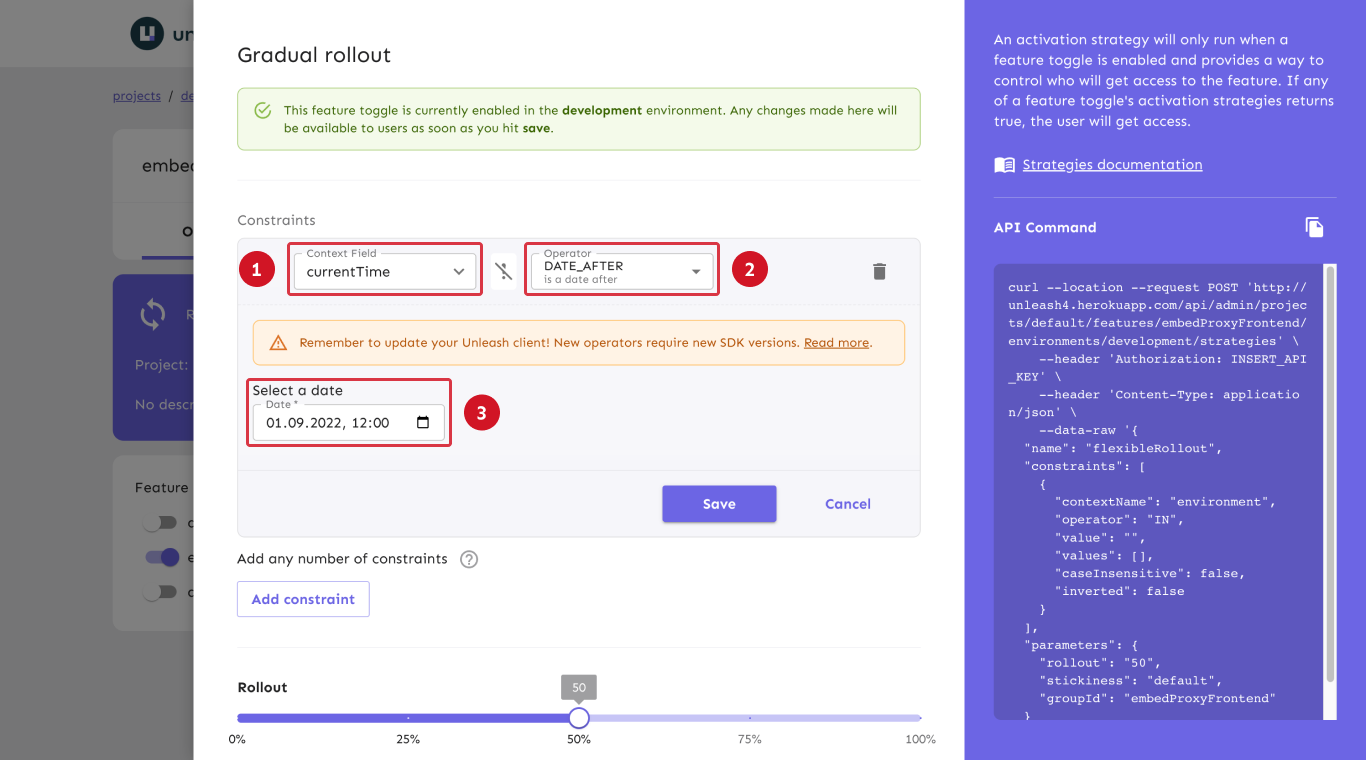
3. Add a date-based constraint by selecting the `currentTime` context field (step 1 in the below image), choosing the `DATE_AFTER` operator (step 2), and setting the point in time where you want the feature to be available from (step 3)
#### Scheduling a release via the API
To add an activation strategy via the Admin API, use the feature's `strategies` endpoint to add a new strategy (see the API documentation for adding strategies to feature flags for more details):
The payload's `"name"` property should contain the name of the strategy to apply (see [activation strategies reference documentation](/concepts/activation-strategies) for all built-in strategies' *modeling names*).
The `"constraint"` object should have the same format as described in the code sample below. The activation date must be in an [RFC 3339-compatible format](https://datatracker.ietf.org/doc/html/rfc3339#section-5.8), e.g. `"1990-12-31T23:59:60Z"`.
```json title="Add a feature activation strategy with a scheduled activation time"
POST api/admin/projects//features/environments//strategies
{
"name": "default",
"constraints": [
{
"value": "",
"operator": "DATE_AFTER",
"contextName": "currentTime"
}
]
}
```
The `"operator"` property in the code sample can be replaced with [any of the other date and time-based operators](/concepts/activation-strategies#date-and-time-operators) according to your needs.