***
title: How to Implement Feature Flags in Java Spring Boot
slug: /guides/implement-feature-flags-in-spring-boot
description: Guide for using Unleash feature flags
keywords: 'implement, feature, flags, feature flags, unleash'
'og:site\_name': Unleash Documentation
'og:title': How to Implement Feature Flags in Java Spring Boot
max-toc-depth: 3
----------------
Java [Spring Boot](https://spring.io/projects/spring-boot) is a popular Java framework for getting apps up and running with minimal configuration. It is often used to develop microservices for large enterprise software.
Leveraging feature flags allows developers to toggle new features on and off, whether you’re experimenting in your local environment, testing for QA purposes, or rolling out changes to users in production. With Unleash, an open-source feature flag service, you can use our tooling to implement feature flags into your application and release new features faster, strategically, and safely. But how can you do this in Java Spring Boot?
In this tutorial, you will learn how to use a feature flag in a Java Spring Boot app. We will use the [Spring Pet Clinic app](https://github.com/spring-projects/spring-petclinic) and the [Unleash Spring Boot SDK](https://github.com/Unleash/unleash-spring-boot-starter) to control how a [Spring Bean](https://docs.spring.io/spring-framework/reference/core/beans/definition.html) is used for a new page.
Watch the video tutorial and follow along with the code from this documentation.
## Prerequisites
In this tutorial, you will need the following:
* A web browser like Chrome or Firefox
* Git
* Docker
* Maven or Gradle for building Java
* (Optional) a code editor like IntelliJ IDEA
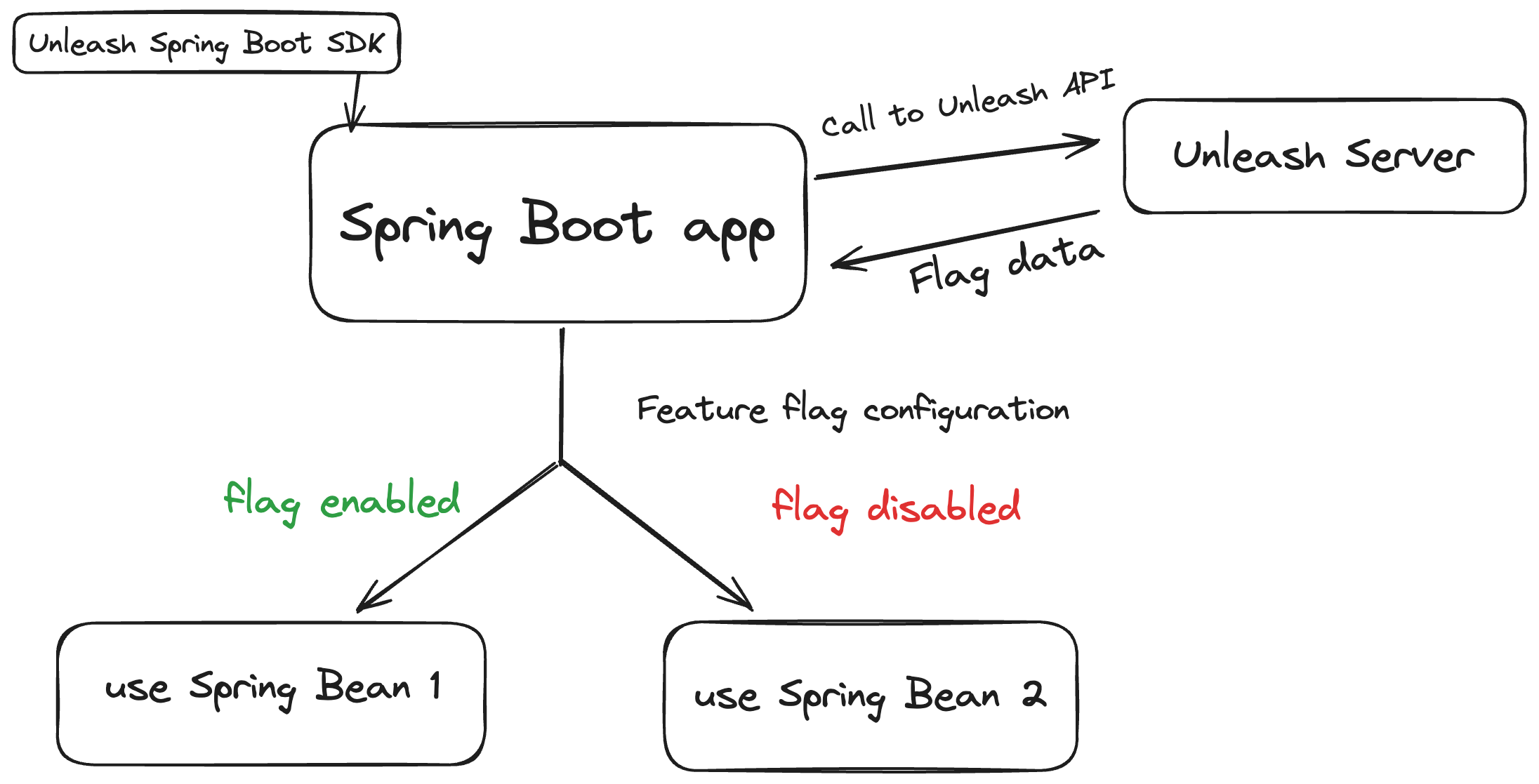
This architecture diagram breaks down how the Java Spring Boot app works with Unleash to use feature flags.
The Unleash Server is a Feature Flag Control Service for managing and storing your feature flags. It enables the retrieval of flag data and, particularly when not utilizing a user interface, supports sending data to and from the service. The Unleash Server has a UI for creating and managing projects and feature flags. API commands are also [available](/api) to perform the same actions from your CLI or server-side app.
The Spring Boot SDK is an extension of the Java SDK, configured for Spring Boot-specific architecture and conventions.
## 1. Feature flag best practices for server-side apps
Since Spring Boot is a framework used for Java backend apps, there are special security considerations to plan around when implementing feature flags.
Most importantly, you must:
* Limit feature flag payloads for scalability, security, and efficiency
* Improve architectural resiliency with graceful degradation
As your application scales, performance and resiliency become more critical and costly if not addressed. A feature flagging system should not be why your app slows down or fails. That’s why we recommend you account for this by reducing the size of your feature flag payloads. For example, instead of making one large call to retrieve flag statuses for all users as part of your configuration, group your users by specific attributes as part of your targeting rules that would be most relevant to your application.
Additionally, you can cache your feature flag configuration to help reduce network round trips and dependency on external services. You can rely on the cache if your Feature Flag Control Service is unavailable, mitigating potential application failure.
For a complete list of architectural guidelines, see our [best practices for building and scaling feature flag systems](/guides/feature-flag-best-practices).
## 2. Install a local feature flag provider
This section guides you through installing Unleash, setting up a local instance, logging in, and creating a feature flag.
Use Git to clone the Unleash repository and Docker to build and run it. Open a terminal window and run the following commands:
```sh
git clone git@github.com:Unleash/unleash.git
cd unleash
docker compose up -d
```
You will now have Unleash installed onto your machine and running in the background. You can access this instance in your web browser at [http://localhost:4242](http://localhost:4242).
Log in to the platform using these credentials:
```
Username: admin
Password: unleash4all
```
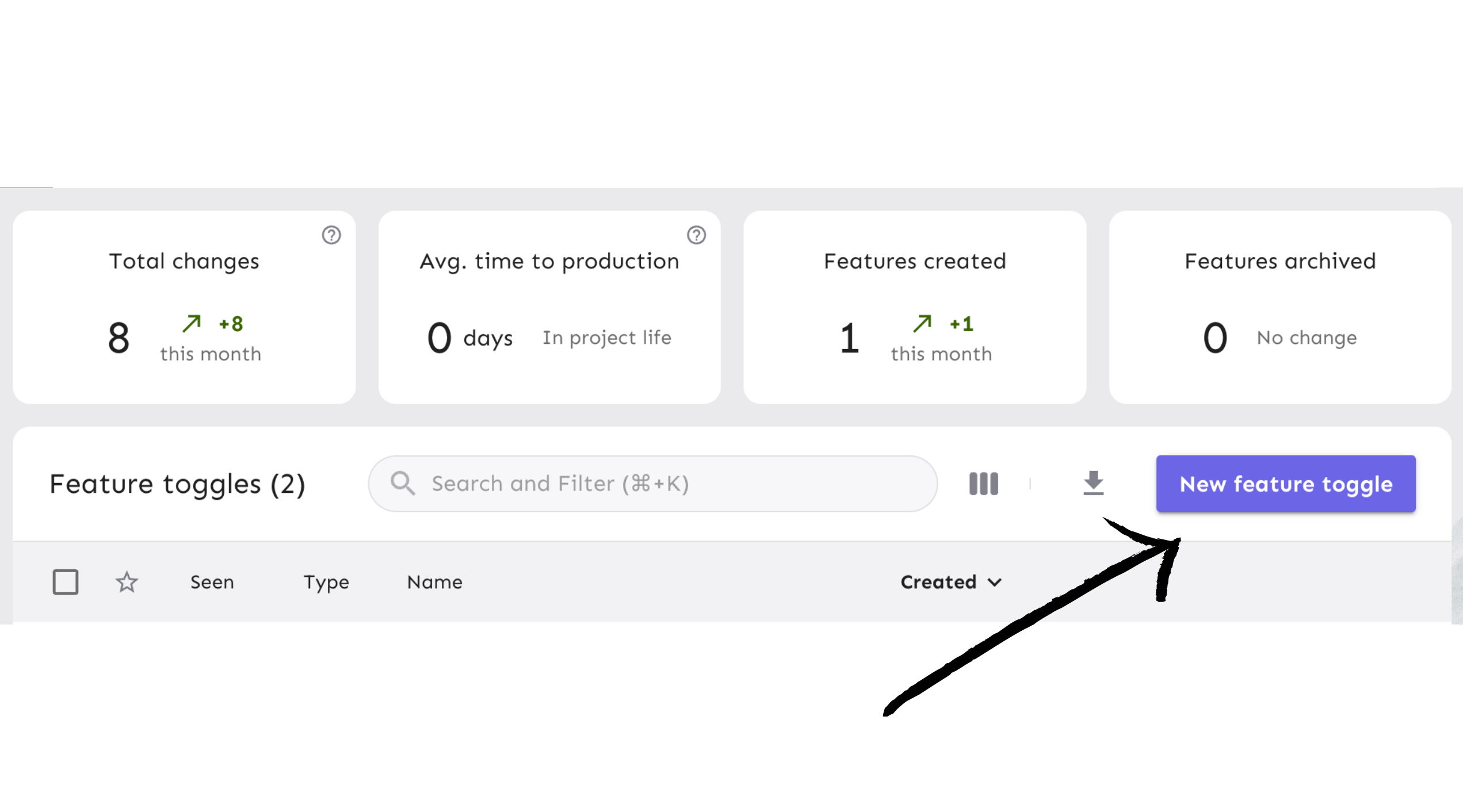
Click the ‘New feature flag’ button to create a new feature flag.
## 3. Create and configure the feature flag
Next, you will create a feature flag and turn it on for your Spring Boot app.
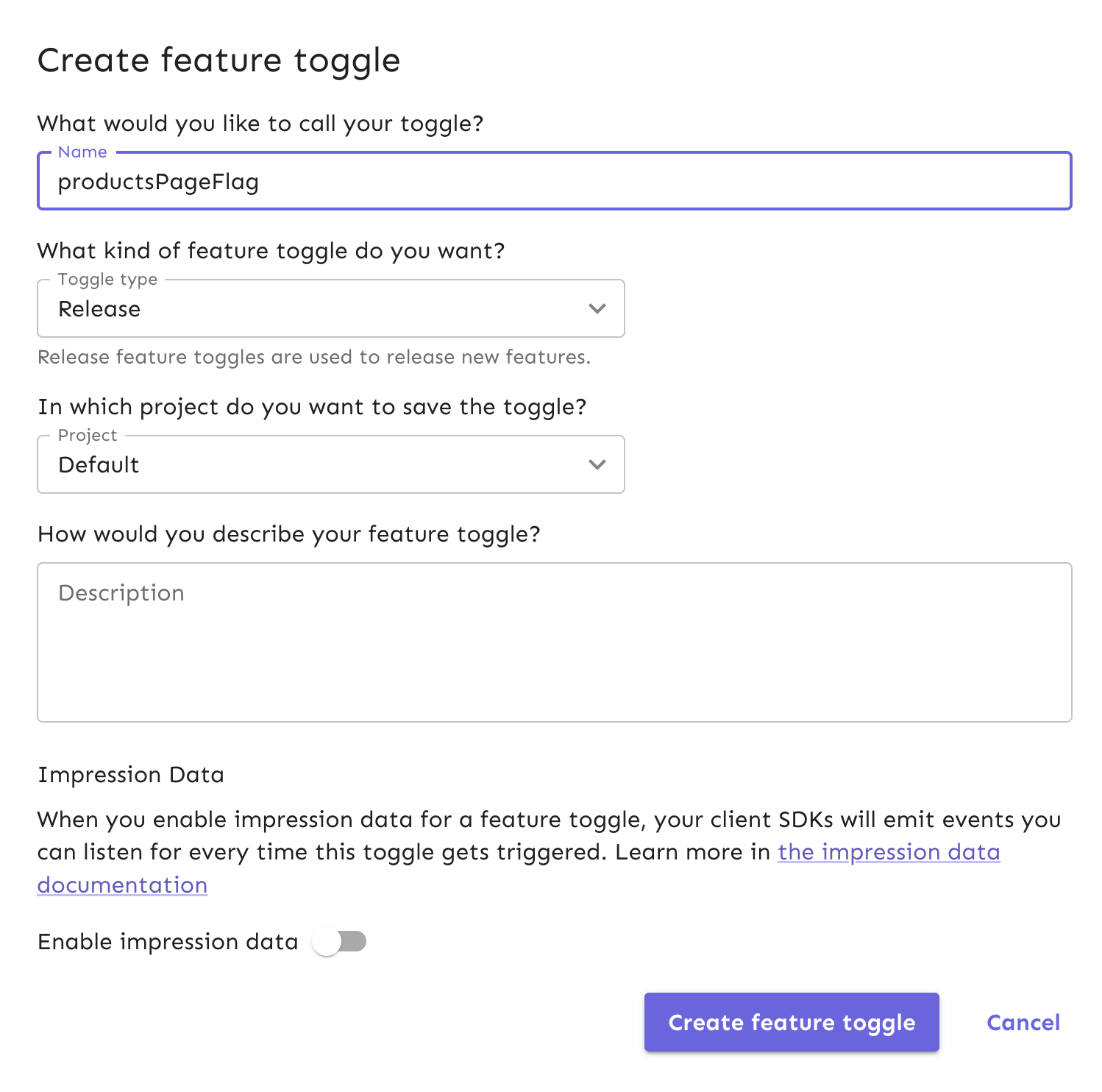
For this tutorial, name the feature flag “productsPageFlag.” In the rest of the feature flag form, use the default values.
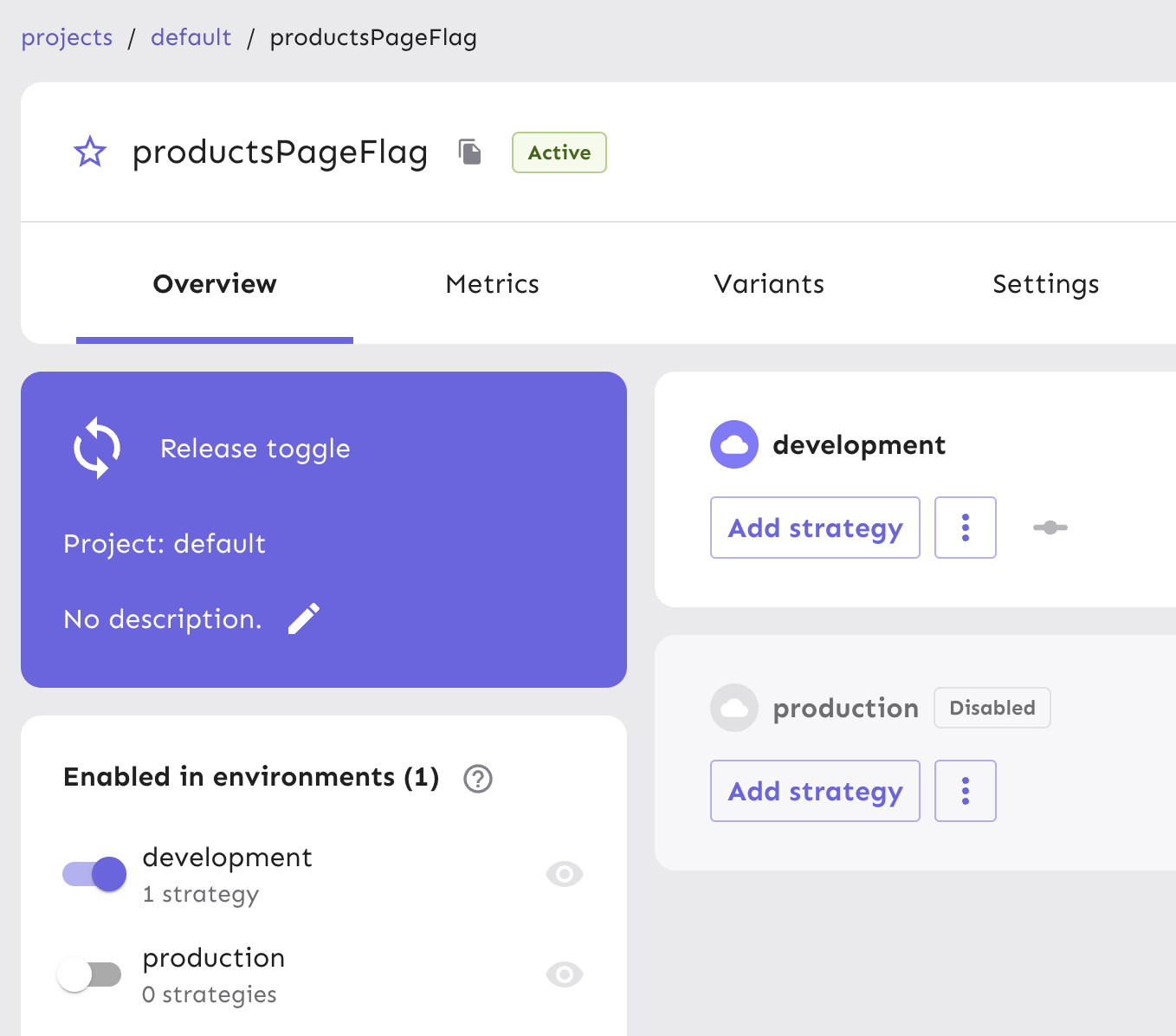
Your new feature flag has been created and is ready to be used. Enable the flag for your development environment, which makes it accessible for use in the Spring Boot app.
Next, generate an API token to use in your app. This API token will eventually be pulled into a configuration object within your Spring Boot app to toggle features.
> **Note:** We require an API token as part of your flag configuration to ensure only applications with the correct authentication can access your feature flags in Unleash. API tokens are created by users with API management access, and this controls how and by whom they can be distributed to applications that need them.
From your project view on the platform, go to Project Settings and then API Access.
Select the ‘New API token’ button.
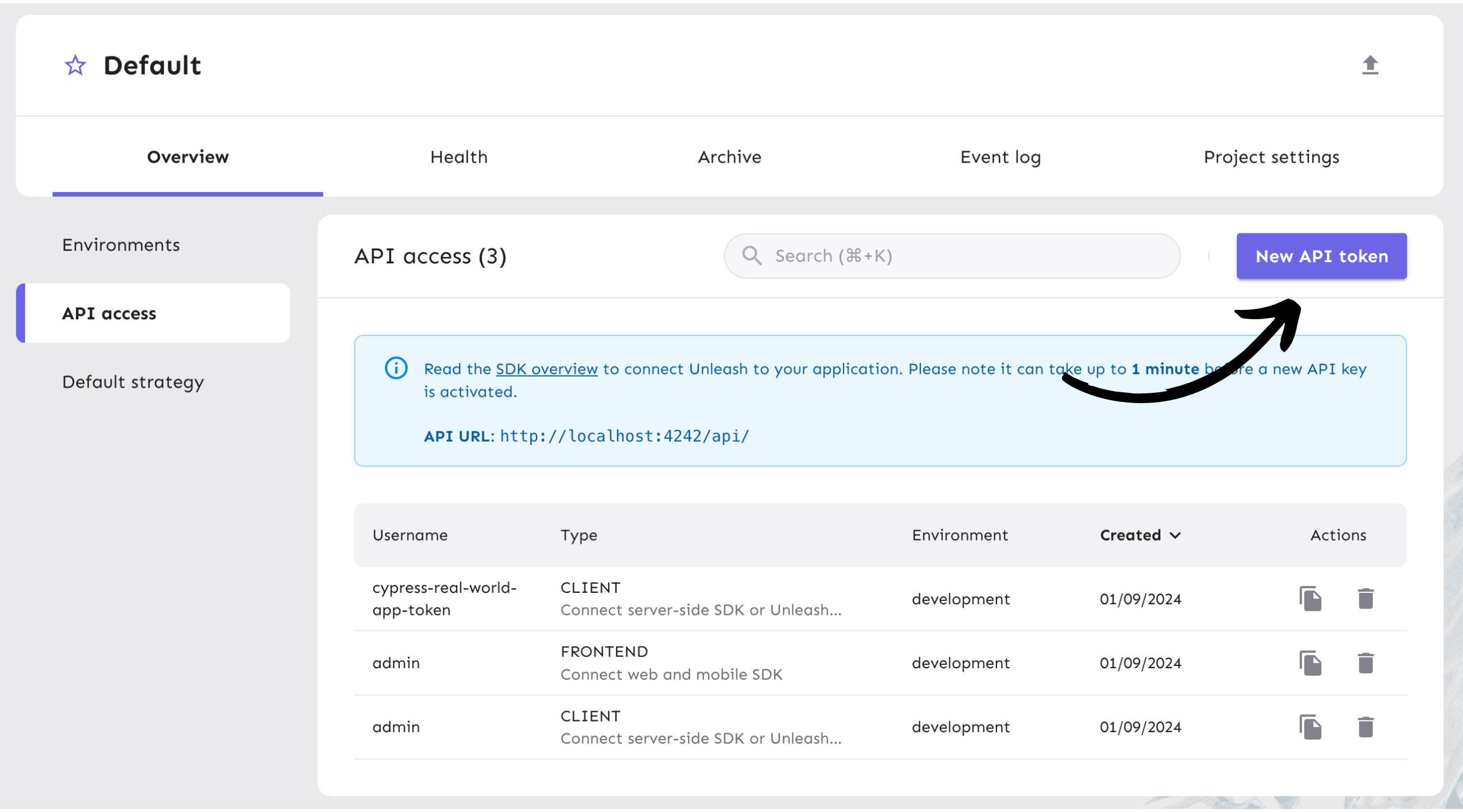
Name the API token and select the “Backend SDK” token type since we’ll be doing our flag evaluation on the server using the Spring Boot SDK. You can read more about [Unleash API tokens](/concepts/api-tokens-and-client-keys#backend-tokens).
The token should have access to the “development” environment, as shown in the platform screenshot below.
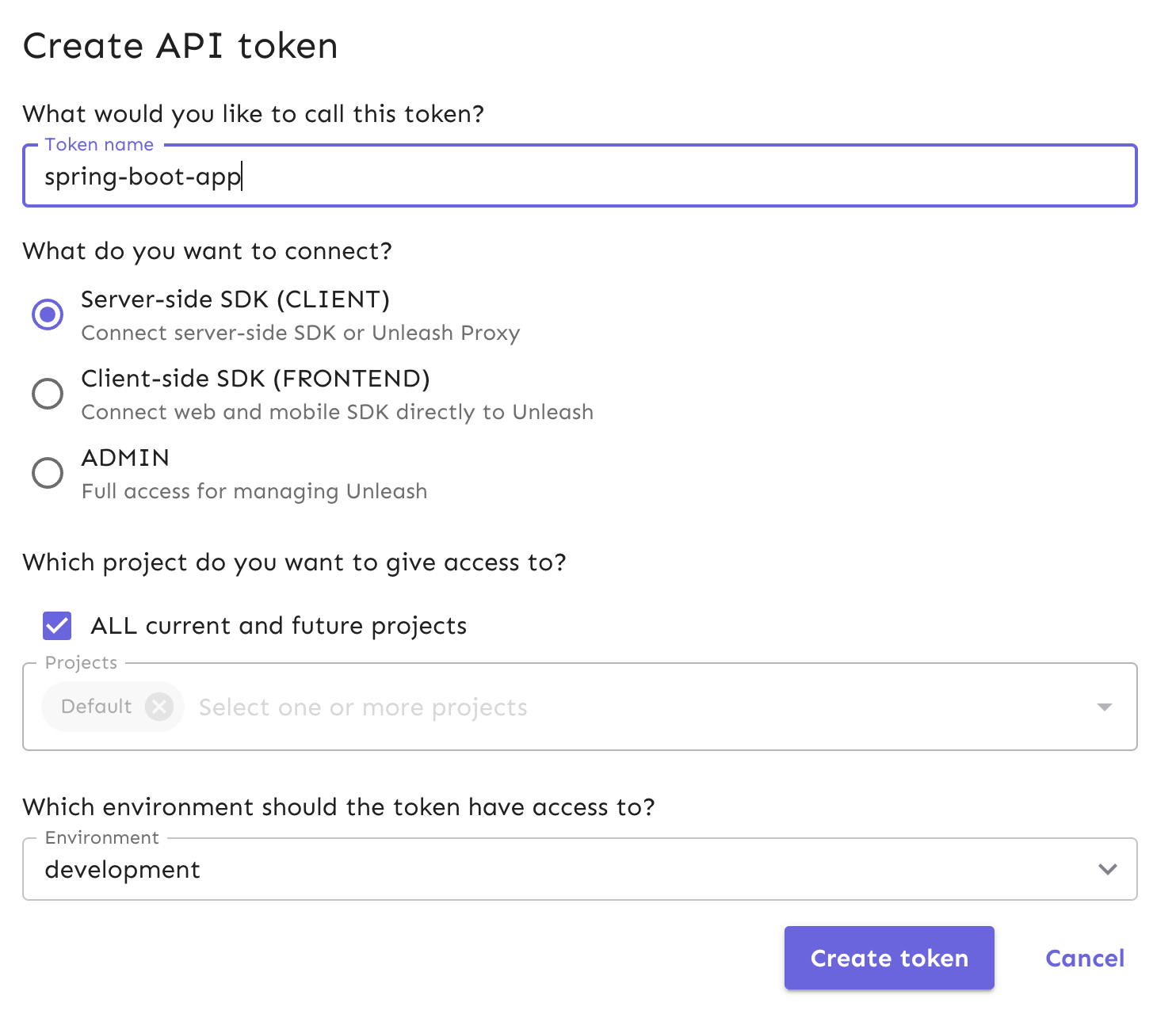
We will use the API token in Step 4.
## 4. Add Unleash to a Spring Boot app
In this section, we will clone an open-source Spring Boot application called [Spring Pet Clinic](https://github.com/spring-projects/spring-petclinic). This is a sample pet clinic web app, featuring built-in customer data, their pets' data, and veternarian information.
We will connect it to your local Unleash instance to use the feature flag we just created.
Use this command to clone the repository via your Terminal:
```
git clone git@github.com:spring-projects/spring-petclinic.git
```
Next, navigate to your repository directory:
```sh
cd spring-petclinic
```
We can use an [Apache Maven](https://maven.apache.org/) command to build the Java source code and run the application.
```
./mvnw package
java -jar target/*.jar
```
Alternatively, you can run Maven directly with the Spring Boot Maven plugin:
```
./mvnw spring-boot:run
```
If you want to use [Gradle](https://gradle.org/) as opposed to Maven to build the project, run the following command:
```
./gradlew build
```
For further details on building and running Spring Pet Clinic locally, refer to the project's [README on GitHub](https://github.com/spring-projects/spring-petclinic?tab=readme-ov-file).
The Pet Clinic application is now accessible at [http://localhost:8080](http://localhost:8080).
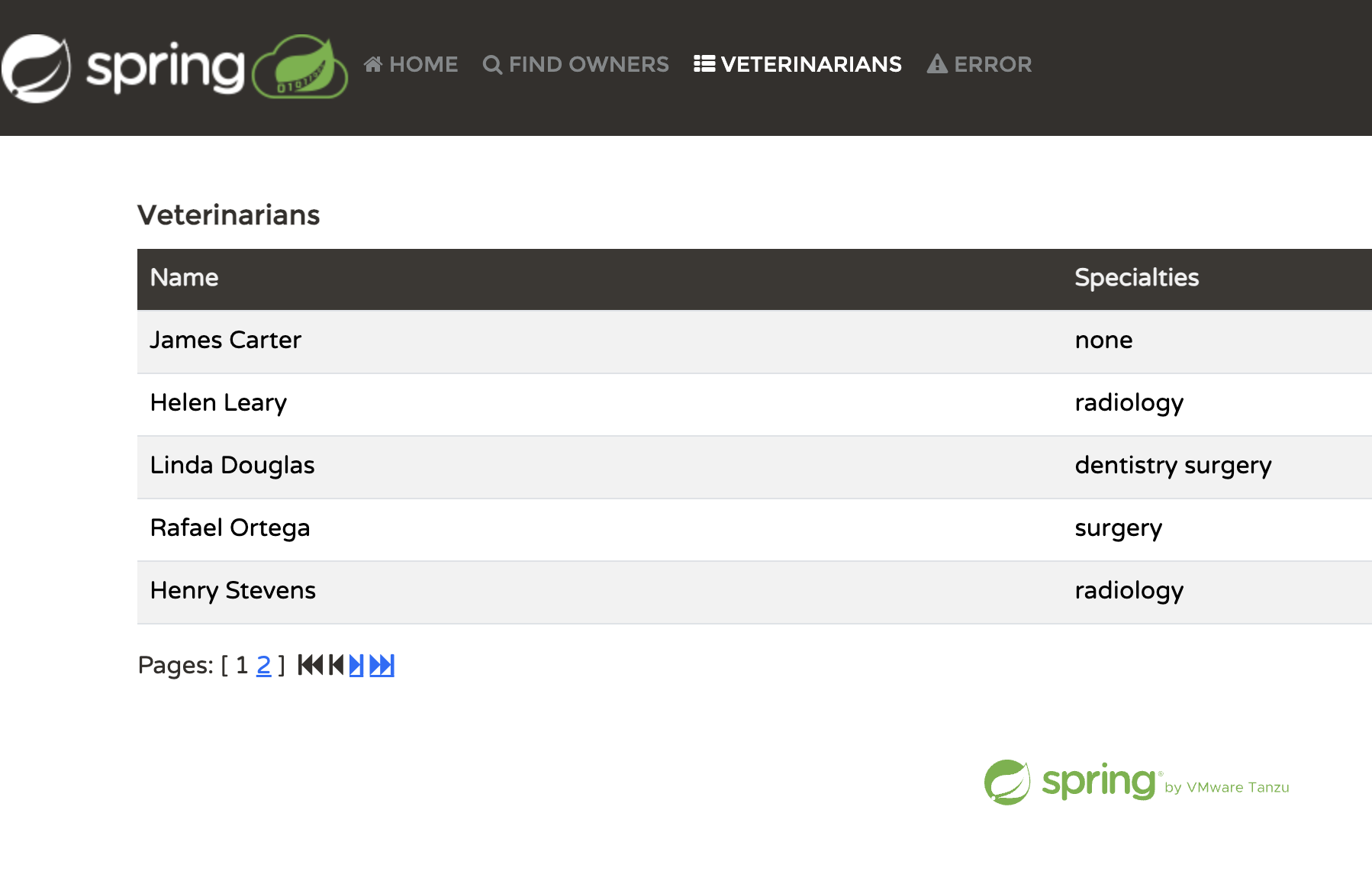
Next, you will add the Unleash Spring Boot SDK to your project dependencies.
In `pom.xml` on line 71, add the dependency to your code:
```xml
io.getunleash
springboot-unleash-starter
1.1.0
```
Next, we can add an Unleash configuration to the `application.properties` file so that the Spring Boot app can connect to the Unleash server.
At the bottom of the `application.properties` file, add the following code snippet:
```yml
# Unleash
io.getunleash.app-name=spring-petclinic
io.getunleash.instance-id=spring-petclinic
io.getunleash.environment=development
io.getunleash.api-url=http://localhost:4242/api
io.getunleash.api-token=
```
Spring Boot allows us to access the key-value data configuration in this file across environments, [similar to an `application.yml` file](https://www.baeldung.com/spring-boot-yaml-vs-properties) found in typical Java applications.
Read more about this particular configuration to get started with [Spring Boot Starter SDK](https://github.com/Unleash/unleash-spring-boot-starter?tab=readme-ov-file#getting-started).
With this configuration setup, we can talk to the Unleash server, illustrated in the architecture diagram.
Replace the `` string in the configuration’s `apiKey` with the API token we created in Unleash. Your token will allow your app to communicate with the Unleash API to use the feature flag we created.
For more specifics, see our [API token and client keys documentation](/concepts/api-tokens-and-client-keys). Our [Spring Boot Starter Usage documentation](https://github.com/Unleash/unleash-spring-boot-starter?tab=readme-ov-file#usage) includes additional use cases.
## 5. Configure Spring Beans in your app
In the real world, you can incrementally introduce new features to a select group of users by adjusting the flag's deployment strategy.
In the context of our tutorial, we will create a new products page in the Pet Clinic app that has two Spring Beans that can be used on the page. The bean class that displays will depend on whether or not the feature flag we created is enabled.
All users will be able to see a new products page in the navigation once we create it, but the flag will determine which version of the page users will see.
To set this up in Spring Boot, we will need to create a few things:
* A Java Interface
* 2 Java classes that implement the interface that the flag will toggle between
* A REST API controller for a new endpoint that will serve the product page
* An HTML file for the product page that the endpoint will return
Let’s create the interface inside the `/owner` directory called `PetProductsService.java`.
Use this code snippet to build the interface:
```java
package org.springframework.samples.petclinic.owner;
public interface PetProductsService {
@Toggle(name = "productsPageFlag", alterBean = "petPrescriptionServiceImpl")
String getPetProductsString(String name);
}
```
This interface uses the `@Toggle` annotation from the Spring Boot SDK. This feature automatically checks if the flag we created is enabled. The `name` parameter checks for the `productsPageFlag`. The `alterBean` parameter will enforce that the prescription service we will create is used when the flag is on. If the flag is off, the general product service we create will show by default.
First, let’s create the first product service implementation based on the interface.
Within the same directory, create a file called `PetProductsServiceImpl.java` and add the following code:
```java
package org.springframework.samples.petclinic.owner;
@Service("petProductsServiceImpl")
public class PetProductsServiceImpl implements PetProductsService {
@Override
public String getPetProductsString(String name) {
System.out.println("We are triggering PET_PRODUCTS_SERVICE_IMPL");
System.out.println(name);
return "GENERAL PET PRODUCTS SERVICE IMPLEMENTATION";
}
}
```
Next, let’s create the 2nd service implementation in a file called `PetPrescriptionServiceImpl.java`.
```java
package org.springframework.samples.petclinic.owner;
@Service("petPrescriptionServiceImpl")
public class PetPrescriptionServiceImpl implements PetProductsService {
@Override
public String getPetProductsString(String name) {
System.out.println("We are triggering PET_PRESCRIPTION_SERVICE_IMPL");
System.out.println(name);
return "PET PRESCRIPTION SERVICE IMPLEMENTATION";
}
}
```
We will need a controller now that we have an interface and two implementations.
Create a new file called `PetProductsController.java` and use this code snippet:
```java
package org.springframework.samples.petclinic.owner;
@Controller
class PetProductsController {
private final PetProductsService petProductsService;
public PetProductsController(@Qualifier("petProductsServiceImpl") PetProductsService petProductsService) {
this.petProductsService = petProductsService;
}
@GetMapping("/products")
public String loadProductsPage(Model map) {
map.addAttribute("petProductsPage", getPetProducts("VIEWING CLINIC PRODUCTS PAGE"));
return "products";
}
public String getPetProducts(final String name) {
return petProductsService.getPetProductsString(name);
}
}
```
In the `PetProductsController` class, we have set up a few things:
* A `/products` endpoint
* We added the pet product service to the model that is injected into an HTML page we will create (`products.html`)
* A method `getPetProducts` that invokes the pet product service
Next, we will create the `products.html` page returned from the `/products` endpoint.
In `resources/templates/`, create `products.html` and use this small code snippet:
```html
Clinic Products
```
Now that we have our services, controller, and an endpoint that maps to a page, we can add the product page to the app's navigation menu.
In `layout.html`, insert a new list item on line 62.
```html
Clinic products
```
The Spring Pet Clinic app uses [Thymeleaf](https://www.thymeleaf.org/) as a templating engine to render HTML in the browser. Now, it will include the products page.
To view the updates in the browser, kill the app in your terminal and restart it.
> :triangular\_flag\_on\_post: **Note:** Depending on the formatting tools configured in your IDE and in the app itself, you might encounter formatting errors. If you see these errors, run `./mvnw spring-javaformat:apply`. After that, run `./mvnw spring-boot:run` again to build successfully.
After refreshing your browser, you’ll see the Pet Clinic app with a new item called “Clinic Products” in the navigation menu.
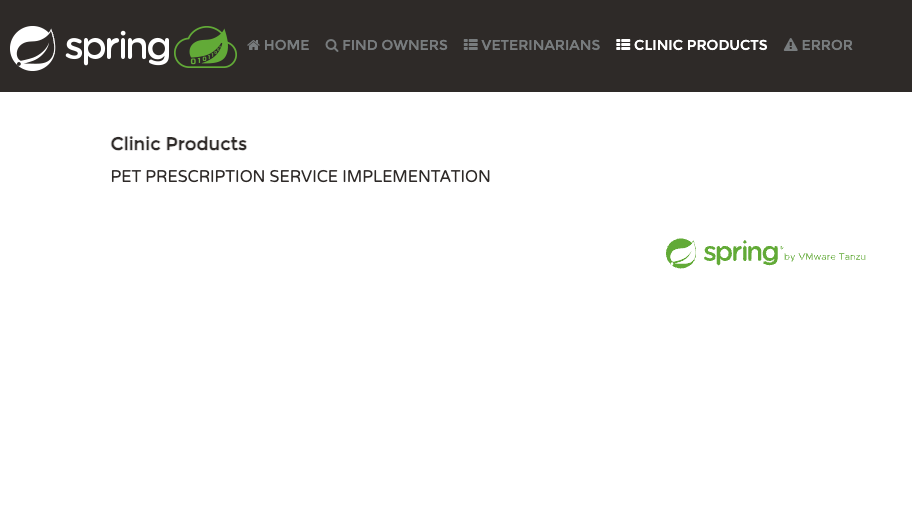
The app has targeted the `PetPrescriptionServiceImpl` file *instead* of `PetsProductServiceImpl` because our flag in Unleash is enabled.
In the real world, separate data sources could be plugged into these different implementations. If you deploy the Clinic Products page to all users, you could roll out one implementation to replace the other.
You can toggle between the two service beans by turning the flag off, which we will experiment with in the next step.
## 6. Verify the feature flag experience
You can verify that the Pet Clinic app will swap implementations on the product page by turning off your flag in Unleash.
In your Unleash instance, turn off the development environment for your flag.
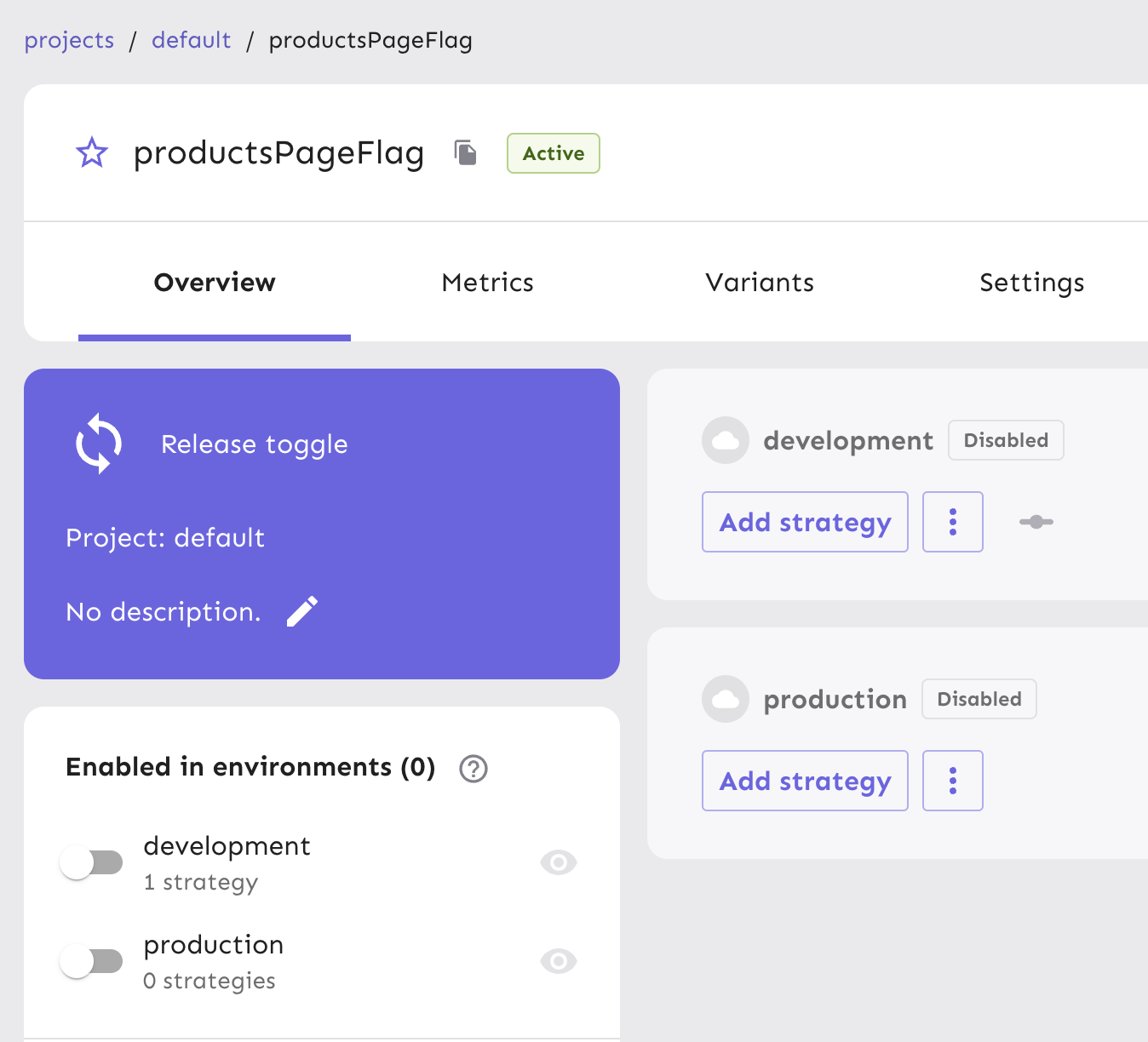
Next, refresh your browser. With the flag turned off, you’ll see changes in the UI.
> **Note:** This might take a moment to reflect changes in your UI since the default refresh interval for Unleash Client is set to 15 seconds.
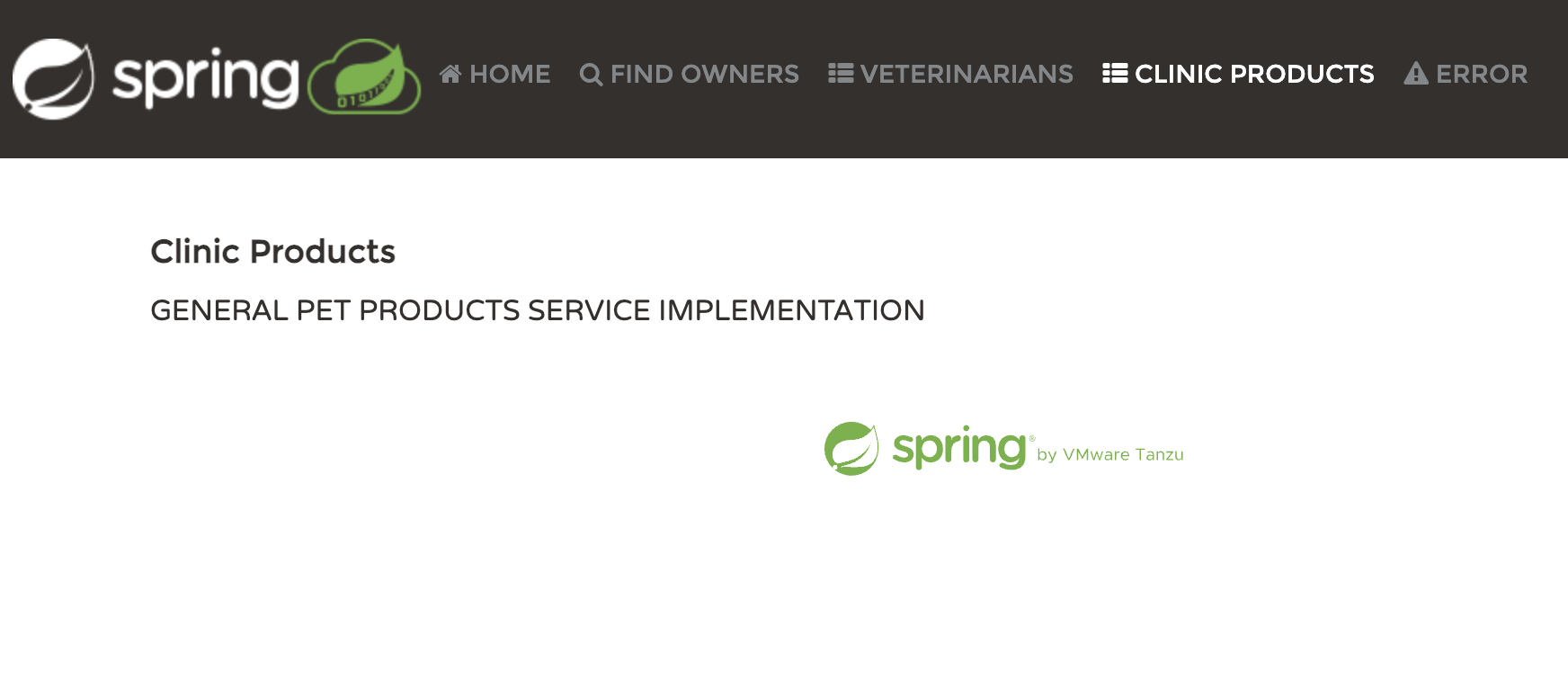
The message rendering in the browser confirms that the app is now targeting the `PetProductsServiceImpl` class instead of `PetPrescriptionServiceImpl`.
## Conclusion
In this tutorial, we created a new feature flag in Unleash and built a new page in the Spring Pet Clinic app. From there, we created two service implementations within the app for the new page and toggled between them with the feature flag. The Unleash Spring Boot SDK gave us the proper annotations to automatically toggle between the two implementations with minimal configuration.
Continue on to our [Spring Boot examples documentation](/guides/feature-flag-examples-spring-boot) for more advanced use cases of feature flags in Java Spring Boot using the Spring PetClinic app!