

Migrating to Unleash
Learn how to plan and execute a migration to Unleash from LaunchDarkly, another feature flag provider, or a homegrown feature flag system.
This guide is based on our experience helping large organizations move to Unleash. The overall approach is the same regardless of what you are migrating from, so the first part of this guide applies to any source system. Later sections cover the specifics of migrating from LaunchDarkly, from a homegrown solution, and from other providers.
We’ll cover how to:
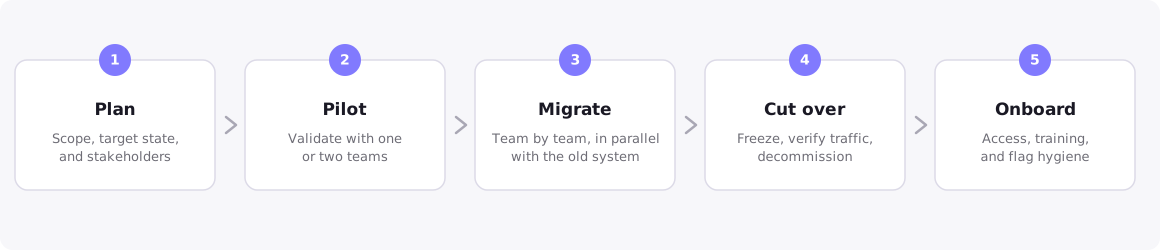
- Work through the five phases of a migration: plan, pilot, migrate, cut over, and onboard.
- Accelerate the migration with AI coding assistants, the Unleash MCP server, and Terraform.
- Migrate from LaunchDarkly, including how LaunchDarkly concepts map to Unleash.
- Migrate from a homegrown solution.
- Migrate from other feature flag providers.
What a feature flag migration involves
A feature flag migration has four workstreams. Sizing each of them early gives you a realistic project plan:
The five migration phases
Phase 1: Plan
Define the scope
Scoping the migration correctly is the single most important factor for success. Two practices consistently make migrations faster and cheaper:
Separate new flags from old flags. Point all new flag creation at Unleash from day one, and treat the migration of existing flags as a separate track. If your current system supports it, disable the creation of new flags there to enforce the separation. This gets your teams to the improved end state immediately instead of blocking them on a long migration tail.
Clean up instead of migrating. Audit your existing flags and classify them as active, permanent, or stale. Stale flags should be removed from code and deleted, not migrated. Unleash helps you avoid accumulating new debt with flag lifecycle tracking and health metrics, but the cheapest flag to migrate is the one you delete.
Avoid making the migration dependent on other initiatives. Teams sometimes couple a feature flag migration to a larger modernization effort, such as breaking a monolith into microservices. This slows both projects down. Enable Unleash for all codebases, including monoliths, independent of their modernization status.
Design the target state
Decide how flags will be organized before you move any data, because the structure drives access control:
- Projects and environments: Choose an organizing principle for projects, typically by team, application, or business domain. Unleash environments are defined once per instance and shared across projects, and a flag is a single entity across all environments with per-environment configuration.
- Naming conventions: A migration is the best opportunity you will get to fix flag naming. Define conventions up front and enforce them with naming patterns.
- Access control: Map your current roles and permissions to Unleash predefined or custom roles, and plan single sign-on and SCIM provisioning so users onboard automatically.
- Hosting and architecture: Decide between cloud-hosted, hybrid, and self-hosted Unleash based on your security and compliance requirements. See hosting options. If you serve flags to frontend applications or operate at high scale, plan for Unleash Edge.
- Instance configuration as code: The Unleash Terraform provider can bootstrap projects, environments, API tokens, roles, and SSO configuration. It intentionally does not manage flags themselves.
If you are migrating a large volume of flags, review the resource limits that apply to flags, strategies, and constraints.
Align stakeholders
Even well-planned migrations need time, budget, and buy-in. Identify who administers the current system, who uses it day to day, and who signs off on security and change management. Involving these stakeholders early prevents delays from unforeseen approval requirements later.
To structure the business case, be explicit about what pain the migration solves: Which practices around deployments, debugging, and rollbacks slow teams down today? What does “better” look like once the migration is complete?
Phase 2: Pilot
Roll out Unleash to one or two teams first, matching the use cases of your current system, before opening it up to the whole organization. Use the pilot to validate the setup against your security and compliance requirements and to refine your onboarding material.
Create the pilot’s flags, activation strategies, and targeting rules from scratch in Unleash, then export the configuration. The export gives you a working schema for the bulk import of active flags in the migrate phase, and validates your project organization early, since projects and environments are the unit of import and export.
Phase 3: Migrate
Migrate team by team or application by application rather than all at once, and use AI and automation for the heavy lifting. For each group of flags:
Create any custom context fields and segments the flags depend on.
Recreate the flags and their targeting rules, either manually for small sets or scripted through the Admin API for large ones. An export of the configuration you built during the pilot serves as a schema for scripted bulk imports.
For moving configuration between Unleash instances or environments, for example from a proof-of-concept instance to production, use import and export.
Run both systems in parallel
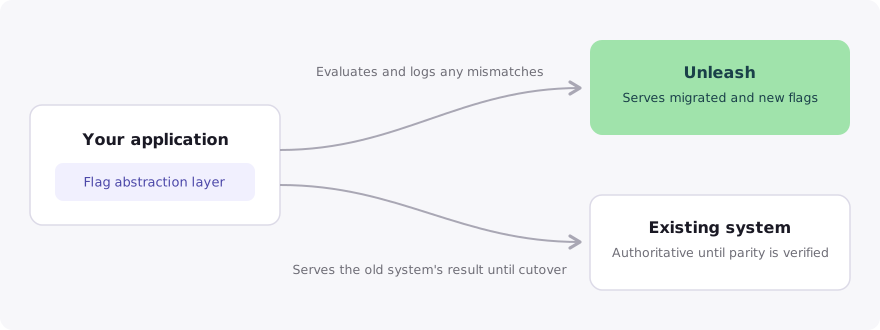
Keep your existing system running as the fallback while you migrate. Most teams wrap flag evaluation in a small abstraction layer, so each call site only changes once. During the transition, the wrapper can:
- Evaluate both systems and return the old system’s answer until you trust the new one.
- Log any mismatches between the two results.
- Cut each flag or service over to Unleash once its mismatch rate reaches zero.
What does it mean to wrap flag evaluation?
A wrapper, also called an abstraction layer or facade, is a small module in your codebase that all application code calls to evaluate flags, instead of calling the flag SDK directly. For example, your code calls your own isFeatureEnabled("checkout-redesign", context) function, and only that function knows which flag system it talks to. Because call sites depend on your interface rather than a vendor SDK, you can switch the implementation from your old system to Unleash, or evaluate both during the transition, without touching application code. For recommended patterns, see best practices for managing feature flags in code.
If you want a standardized abstraction instead of a custom wrapper, OpenFeature provides a vendor-neutral API with an Unleash provider for several languages; see all Unleash providers in the OpenFeature ecosystem. Teams already using OpenFeature can switch backends by swapping the provider, with no changes to evaluation call sites. The OpenFeature Multi-Provider, available for select SDKs, can evaluate two providers behind one interface and compare their results, which gives you shadow evaluation with minimal custom code.
Phase 4: Cut over
Once a team or application is fully on Unleash:
Phase 5: Onboard
Plan onboarding as part of the migration, not as an afterthought. Set up single sign-on and SCIM provisioning so joining is frictionless, and use user management and access controls to give teams the right permissions from the start.
Unleash Customer Success provides tailored training for teams new to Unleash or to feature flags in general. For self-paced learning, point your teams to the Unleash Learning Lab.
Accelerate the migration with AI and automation
Unleash is API-first: everything you can do in the Admin UI is also available through the Admin API, so the entire data migration can be scripted end to end. If your current system supports exporting flag definitions, an AI assistant can help convert the export into the Unleash import format or into Admin API calls. Review translated targeting rules and code-level rewrites before cutover.
Migrate from LaunchDarkly
Teams that move from LaunchDarkly to Unleash most often do so to reduce licensing costs, frequently combined with requirements for self-hosting and keeping user data within their own infrastructure. The five migration phases, from planning to onboarding, apply directly to LaunchDarkly migrations. This section covers how LaunchDarkly concepts map to Unleash, how to move your flag definitions, how to update your application code, and which behavioral differences to plan for.
Map LaunchDarkly concepts to Unleash
Move your flag definitions
Unleash provides two ways to bring flag definitions in programmatically: the Admin API, which can create and configure every part of a flag, and the import functionality, which loads a JSON file of flags and their configuration per project and environment. A typical data migration uses them like this:
Export your flag and segment definitions as JSON using the LaunchDarkly REST API.
Create custom context fields and segments in Unleash first, since flag strategies reference them.
Recreate flags and their strategies through the Admin API, or transform the exported data into the import format and import it per project and environment. Import files are limited to 500 kB, so batch large migrations.
Targeting rules need the most attention in this step. Review each translated rule rather than trusting the script output, because rule semantics rarely map one-to-one between providers.
Update your application code
The SDK architecture maps cleanly between the two systems:
- LaunchDarkly server-side SDKs and Unleash backend SDKs both evaluate flags locally in your application.
- LaunchDarkly client-side SDKs and Unleash frontend SDKs both receive evaluated results, so no targeting rules or user data are exposed to the client.
- One difference to plan for: LaunchDarkly SDKs stream updates from LaunchDarkly’s service by default, while Unleash SDKs poll your Unleash instance or Edge at a configurable interval, with changes typically propagating within seconds. Unleash relies on polling by default because it is a more stable architecture, and you can enable real-time streaming through Unleash Edge if you need it.
At the call-site level, the evaluation calls map as follows:
If your code already uses OpenFeature with the LaunchDarkly provider, you can keep your evaluation call sites unchanged and swap in the Unleash OpenFeature provider for your language, listed in the OpenFeature ecosystem, adjusting only the provider initialization and context mapping.
Plan for behavioral differences
- Flag names are unique per instance. LaunchDarkly flag keys are unique per project; Unleash flag names are unique across the whole instance. If the same key exists in multiple LaunchDarkly projects, rename on migration, for example by prefixing with the project name.
- Percentage rollouts re-bucket on cutover. LaunchDarkly and Unleash use different hashing algorithms to assign users to rollout buckets, so the users inside a 50% rollout will not be the same after migration. Where possible, migrate flags while they are at 0% or 100%, and cut partially rolled-out flags over at a natural boundary.
- Archived flags behave differently. LaunchDarkly serves the in-code fallback value for archived flags. Archived Unleash flags are no longer exposed to SDKs, so evaluation returns
falseor your SDK-level default. Verify your defaults are safe before archiving migrated flags. - Typed defaults move into code or variants. LaunchDarkly stores per-flag default and off variations server-side. In Unleash, a disabled flag evaluates to
false, and non-boolean defaults belong in your code or in variant payloads.
Migrate from a homegrown solution
A homegrown feature flag system, also called an in-house or custom-built system, is one your organization developed itself: an internal flag service, a set of database tables, or configuration files read at startup. Replacing a homegrown system is among the most common migration paths to Unleash. Homegrown tools tend to reach their limits as organizations grow, so teams migrate for scalability, reliability, and to reduce the ongoing cost of maintaining an internal tool.
For a real-world example, see how Wayfair replaced its homegrown system with Unleash at a third of the cost, or browse more customer case studies.
The migration follows the same five phases, from planning to onboarding, with a few specifics:
- You likely already have an abstraction layer. Most homegrown systems are accessed through a small set of helper functions. Add Unleash behind those helpers, evaluate both systems during the transition, and you avoid touching every call site twice.
- Inventory is the hard part. Homegrown systems rarely track flag ownership or lifecycle. Budget time to identify the owner of each flag, and delete flags that remain unclaimed.
- Script the transfer. Read your existing flag store directly and create the corresponding flags through the Admin API. Because homegrown flags are usually simple on/off switches, this translation is typically straightforward.
- Add capabilities after the migration. Resist redesigning every flag with targeting rules and variants during the migration itself. Move flags over as they are, then adopt activation strategies, segments, release management, and other capabilities as teams need them.
Migrate from other feature flag providers
The same four workstreams and five migration phases apply when migrating from providers such as Harness, Flagsmith, ConfigCat, or Optimizely:
Build a concept mapping first. Identify how the provider’s targeting rules, segments, percentage rollouts, and multivariate flags translate to Unleash activation strategies, segments, and strategy variants.
Export flag definitions through the provider’s REST API and script the recreation through the Unleash Admin API.
Wrap evaluation calls, or use OpenFeature if the provider supports it, run both systems in parallel, and cut over incrementally.
Watch for the same behavioral differences as with LaunchDarkly: rollout re-bucketing due to different hashing, flag naming rules, and fallback semantics for archived or missing flags.
Key takeaways
-
Point new flags at Unleash from day one. Separate the new-flag track from the migration of old flags so teams benefit immediately.
-
Delete before you migrate. Most long-lived systems are full of stale flags; cleaning them up shrinks the migration and the codebase.
-
Design structure before moving data. Projects, environments, naming conventions, and access control are much easier to get right up front.
-
Migrate incrementally with a fallback. Run both systems in parallel behind an abstraction layer, verify parity, and cut over team by team.
-
Automate the mechanical work. Unleash is API-first, so scripts, Terraform, and AI assistants using the Unleash MCP server can handle most of the data transfer and code changes.
-
Decommission deliberately. Freeze flag creation in the old system, wait for evaluation traffic to reach zero, then remove it.
Frequently asked questions
How do we migrate from LaunchDarkly to Unleash?
Follow the five migration phases, then use the LaunchDarkly section of this guide for the specifics: map LaunchDarkly concepts to Unleash, move your flag definitions using the LaunchDarkly REST API and the Unleash Admin API, update your application code, and plan for behavioral differences such as percentage rollouts re-bucketing.
Do we need to migrate all of our existing flags?
No. Audit your flags first and migrate only those that are active or permanent. Stale flags should be removed from code and deleted. In mature systems, this is often a large share of the total, which significantly reduces the migration effort.
Can we run Unleash alongside our existing system during the migration?
Yes, and you should. Keep the existing system as the authoritative fallback while you verify that Unleash returns the same results, then cut over per flag, team, or service. Running two flag systems in parallel is safe and common.
How do we transfer flag definitions from another provider?
Export the definitions through the source provider’s API, then recreate them through the Unleash Admin API or transform them into the import format and load them per project and environment. Always review the translated targeting rules manually, because rule semantics differ between providers.
Will the same users be in our percentage rollouts after migrating?
No. Different providers use different hashing algorithms to assign users to rollout buckets, so a 50% rollout in your old system and a 50% rollout in Unleash contain different users. Plan cutover of partially rolled-out flags accordingly. Within Unleash, stickiness keeps assignments consistent.
How long does a migration take?
It depends on the number of active flags, codebases, and teams involved. With incremental execution, individual teams are typically productive on Unleash within days, while the migration of legacy flags runs alongside normal work over weeks or months. The migration is complete when the old system serves no evaluation traffic.