

Schedule feature releases
There’s a whole host of reasons why you may want to schedule the release of a feature, such as:
- to release a feature at a specific date and time (for a product launch, for instance)
- to make a feature available only up until a specific moment (for a contest cutoff, for instance)
- to make a feature available during a limited period (for a 24 hour flash sale, for instance)
In this guide we’ll schedule a feature for release at some point in time. The exact same logic applies if you want to make a feature available until some point in the future. Finally, if you want to only make a feature available during a limited time period, you can easily combine the two options.
Prerequisites
This guide assumes that you’ve got the following:
- some basic experience with Unleash
- a running instance of Unleash and connected clients (where applicable)
- an existing feature flag that you want to schedule the release for
Schedule feature releases with strategy constraints
Strategy constraints are the easiest way to schedule feature releases (as long as your SDKs are up to date). You can use this approach with any strategy you want. The strategies will work just as they normally do, they just won’t become active until the specified time. For example: with the standard strategy, the feature would become available to all your users at the specified time; with a gradual rollout, the rollout would start at the specified time.
Step 1: Add an activation strategy with a date-based constraint
Scheduling a release via the UI
To schedule a feature release via the UI:
- Add the desired activation strategy to the feature
- Open the constraint creator by using the “Add constraint” button
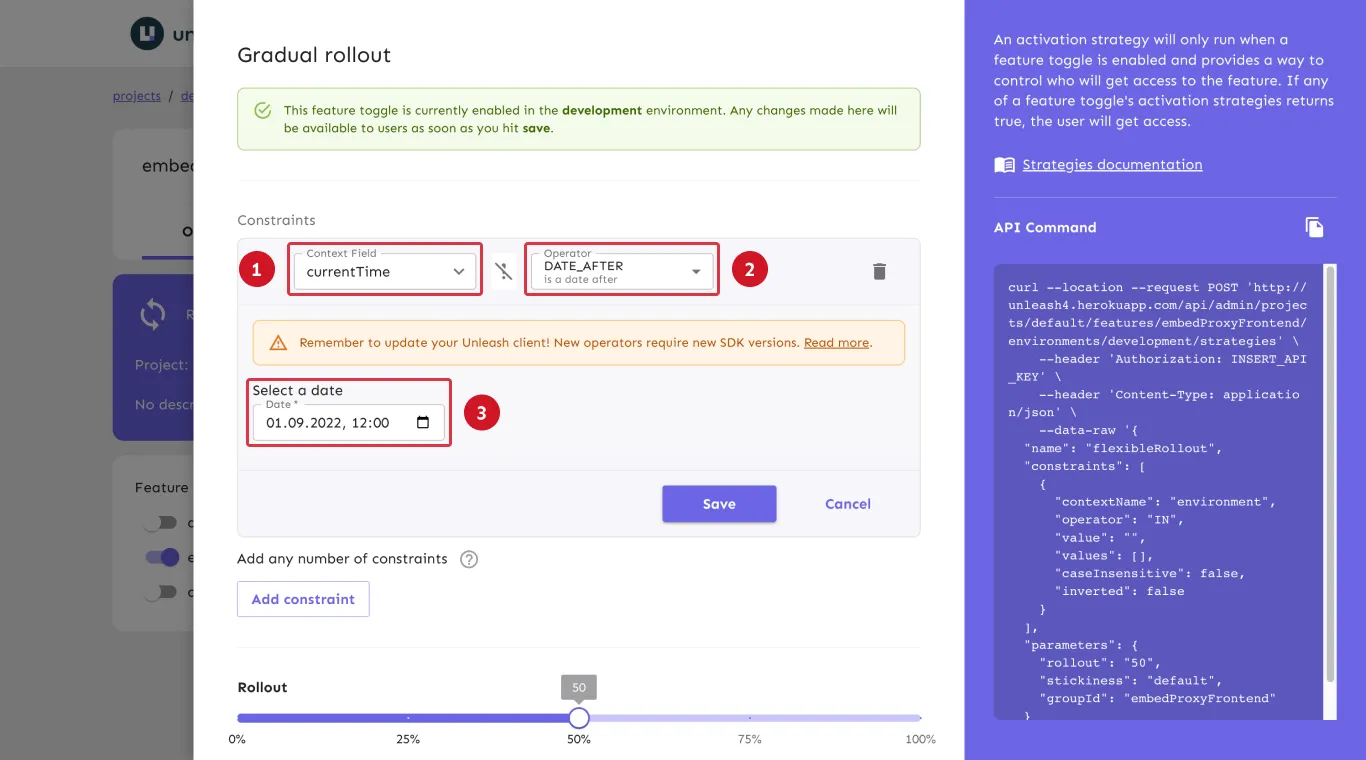
- Add a date-based constraint by selecting the
currentTimecontext field (step 1 in the below image), choosing theDATE_AFTERoperator (step 2), and setting the point in time where you want the feature to be available from (step 3)
Scheduling a release via the API
To add an activation strategy via the Admin API, use the feature’s strategies endpoint to add a new strategy (see the API documentation for adding strategies to feature flags for more details):
The payload’s "name" property should contain the name of the strategy to apply (see activation strategies reference documentation for all built-in strategies’ modeling names).
The "constraint" object should have the same format as described in the code sample below. The activation date must be in an RFC 3339-compatible format, e.g. "1990-12-31T23:59:60Z".
The "operator" property in the code sample can be replaced with any of the other date and time-based operators according to your needs.
Limitations and alternatives
Date and time constraints define one-time windows. Unleash evaluates them against the currentTime context field, which holds a complete timestamp and defaults to the time of evaluation. For example, you can:
- Release a feature at a specific date and time with a
DATE_AFTERconstraint. - Make a feature available during one limited period by combining a
DATE_AFTERand aDATE_BEFOREconstraint in the same strategy. - Cover several distinct periods by adding one strategy per period, each with its own pair of date constraints; the flag activates if any strategy matches.
Recurring schedules cannot be expressed with date constraints, because the date and time operators compare complete timestamps rather than parts of them. This includes rules such as every day between 09:00 and 17:00, on weekdays only, or during the same week every year. To implement a recurring schedule, use an external scheduler that updates the flag through the Admin API, or define a custom context field, such as hourOfDay or dayOfWeek, that your application sets and your strategy constrains on.
As an alternative to date constraints, you can use scheduled change requests to apply any flag change at a specific point in time. For multi-phase releases, release templates let you predefine each phase of a rollout as a milestone and move through the phases without reconfiguring strategies by hand.
Frequently asked questions
Can I schedule a recurring release?
Date constraints define one-time windows. To implement a recurring schedule, such as making a feature available every day between 09:00 and 17:00 or only on weekdays, use an external scheduler that updates the flag through the Admin API, or a custom context field, such as hourOfDay or dayOfWeek, that your application sets and your strategy constrains on. See Limitations and alternatives.
What time zone do date constraints use?
Date constraint values are absolute points in time, stored in RFC 3339 format with a time zone offset. Unleash compares the value against the currentTime context field as absolute times, so the result does not depend on the time zone of the Unleash server or of the application evaluating the flag.
Can I schedule a feature to turn off?
Yes. Use a DATE_BEFORE constraint to keep a strategy active only until a specific time, or use a scheduled change request to disable the flag at a specific time.
Can I schedule changes other than enabling a feature?
Yes. Scheduled change requests can apply any flag configuration change at a scheduled time, such as updating a strategy or archiving a flag.