

What is a feature flag and why are feature flags used?
Feature flags allow you to release, test, and manage features and functionality across your application without redeploying. Organizations use added control and flexibility to deliver more and higher quality features with reduced cost, time, and risk.
In this guide, we’ll introduce you to the basics of feature flags and why so many development teams choose them.
TL;DR
- Feature flags let you turn features on or off at runtime without changing source code or redeploying.
- They decouple code deployment from feature release, giving teams control over what users see and when.
- Developers use them to reduce risk, run production experiments, and speed up release cycles.
- Release, experiment, kill switch, operational, permission, and sunset flags each address a different stage or need in the feature lifecycle.
- FeatureOps is the discipline that extends feature flags into autonomous release workflows guided by real production signals.
What is a feature flag?
A feature flag is a software engineering technique that turns features or functionality on or off without modifying the source code or requiring a redeploy. It’s also referred to as feature toggles, switches, flippers, or bits.
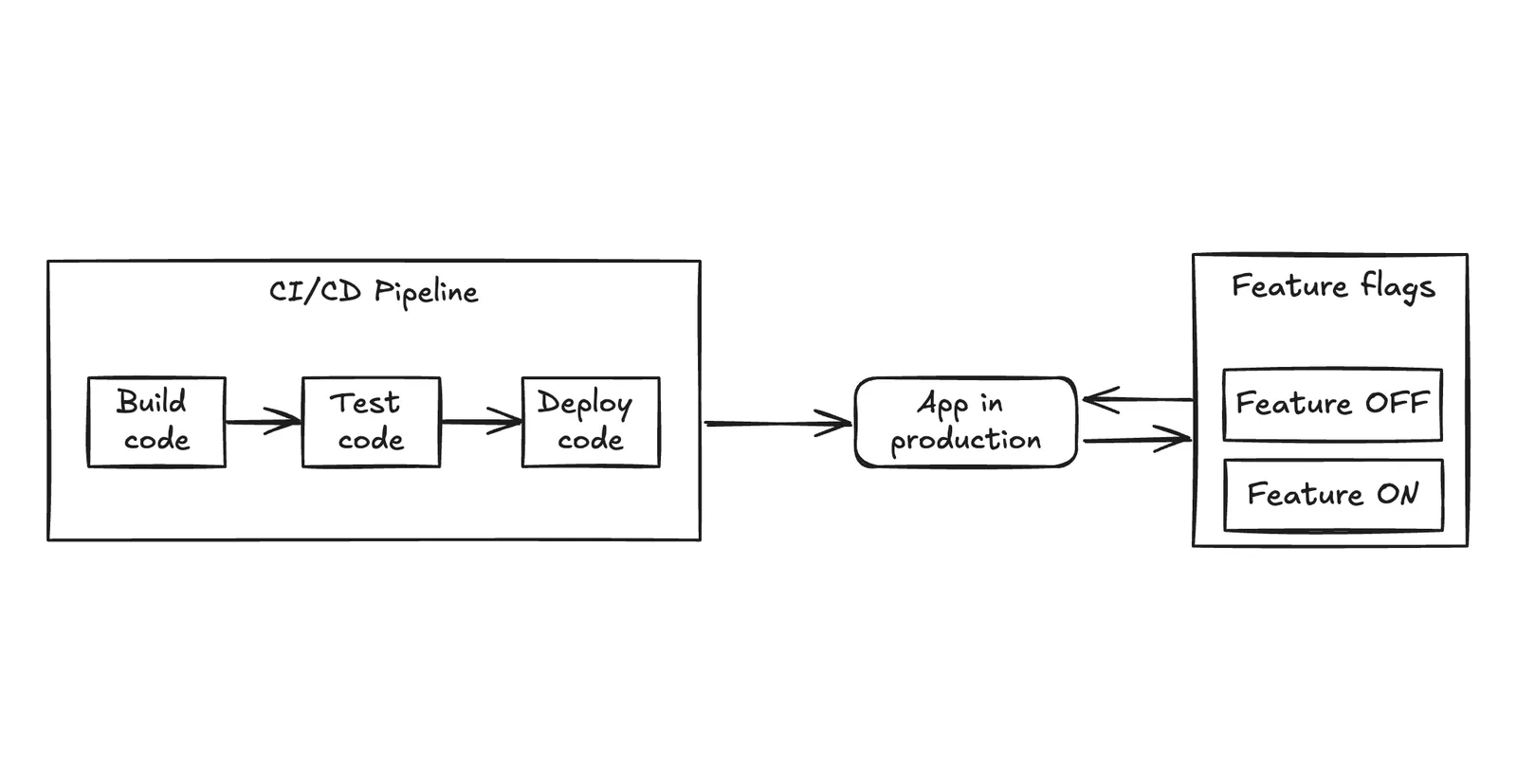
At their core, feature flags decouple code deployment from feature release. Code reaches production on your deployment schedule, but features become visible to users only when you enable them at runtime. This distinction—deployment is not release—is fundamental to modern software delivery.
Feature flags enable you to release and test new features by making them available to a specific group of users, or no users at all, with the power to immediately turn them off without any risk to the rest of your application.
The control that feature flags allow means that they’re already becoming a popular superpower in feature lifecycle management. Combined with feature management platforms and processes, they can enable a cultural shift within organizations towards more agile and experimental development and ways of serving users.
Why developers use feature flags
The easiest way to explain why developers use feature flags is to understand the story of why Ivar Østhus, our CTO, created the Unleash feature flag service in the first place. Here’s Ivar in his own words:
In 2014, I was working as a software developer at FINN.no, Norway’s largest online marketplace. Getting new features into production was a pain, so, as a developer, I looked around and wondered if I could write some code to make it easier. My initial goal was to protect features under development, allowing our team to transition to trunk-based development—a practice recommended according to the State of DevOps Report.
Even back at that time, we embraced agility with an automated delivery pipeline which made fixing bugs a breeze, but frequent feature releases? Not so much. Building features takes time, and waiting weeks for production testing felt wasteful. We used feature branches, a common approach, to isolate unfinished features. However, this created a tangled web of problems:
- Limited feedback: Getting stakeholder input required manually deploying test environments for each branch, a cumbersome process.
- Merge mayhem: Conflicts became a constant headache, delaying progress.
- Production mystery: Would a change actually work in production with production data? Were there any edge cases we had not considered?
Frustrated by the slow pace and the additional complexity of feature branches, I explored ways to streamline the development process through code. This is how I ended up creating Unleash, a popular open-source feature flag solution that solves these problems by decoupling code deployments and feature releases.
Benefits of feature flags
With an understanding of what feature flags are, let’s look at the key benefits of using feature flags, such as improved user experience, faster release cycles, and more effective testing and experimentation.
Improve user experience
Feature flags give you more control over what is released, to whom, and when. This means you have more control over the user experience of your end product. Instead of making release decisions based mostly on operational constraints and risk fears, you have the control to make features available based on what makes the most sense for specific users as well as your business goals. For example, releases can be timed to align with marketing campaigns, customer support, and product marketing efforts.
Level up your QA
Feature flags are a powerful tool for quality assurance (QA) as they allow you to test features under specific conditions that you define. This testing happens within the full context of your live product, as your users would experience it. That is because with trunk-based development, once a feature is coded, it exists in production. However, feature flags enable you to make a feature visible only to those users you want.
Reduce risk
Feature flags reduce risk by decoupling deployment from release, allowing teams to deploy new code to production without immediately making the changes live for all users. This approach ensures that even if there are issues with the new code, it doesn’t impact users right away, providing a safer environment to validate changes.
Moreover, feature flags enable quick mitigation of issues by allowing teams to instantly disable problematic features without rolling back the entire deployment, minimizing downtime and user disruption. Additionally, they offer granular control over feature exposure, enabling targeted releases to specific user segments, which reduces the risk of negatively impacting the entire user base while providing valuable feedback from a smaller, controlled group.
Speed up release cycles
Feature flags significantly accelerate operational release cycles by enabling rapid release, testing, and rollback of features. This speed allows teams to adopt a more action-oriented and experimental approach, quickly iterating on new ideas without the risk of complex code integrations or burdensome deployments. Even when multiple teams are working on overlapping components of complex applications, feature flags streamline the process by reducing dependencies and conflicts.
Additionally, automated feature flags can dynamically enable or disable features based on user behavior or system events, further speeding up the adaptation process. By embracing a CI/CD (continuous integration and continuous deployment) workflow with feature flags, teams can deliver improvements to their applications more frequently and reliably, ensuring a faster, more agile development cycle.
Enable testing and experimenting
A/B testing is a great example of the power of feature flags. Use your quick control of who has access to what to understand how and when users are interacting with your features. Which functionalities are serving them best? In what circumstances are new features helping or hindering your users? How are different features interacting with one another at different times?
Set up testing to serve new features to specific groups of your power users or target demographics without any risk to your build or visibility to other users. With more power to test with less risk, teams outside of the product team are also enabled to adopt an agile and experimentation mindset.
Feature flags vs. feature branches
While feature flags and feature branches may sound similar and are often used with overlapping goals, there are key operational and outcome differences that development teams should carefully evaluate.
A feature branch is a workflow within a Git repository that allows developers to isolate the code for a new feature into a separate branch, distinct from the main branch (i.e., the main codebase). This isolation minimizes the risk of introducing broken code into the main codebase during development and after deployment.
Feature branches, while common, pose a few challenges:
- Delayed feedback: Gathering feedback from stakeholders can be slow and cumbersome because it often requires setting up separate test environments for each branch, adding time and complexity to the process.
- Merge conflicts: Integrating changes from multiple branches into the main codebase can lead to conflicts, which are time-consuming to resolve and can stall development progress.
- Uncertainty in production: It’s challenging to predict how code changes will perform in a production environment with real data, increasing the risk of encountering unexpected issues or edge cases that weren’t considered during development.
Do you still need feature flags if you use feature branches?
In an ideal world, feature flags and trunk-based development offer a streamlined alternative to feature branches by enabling continuous integration and minimizing merge conflicts. Feature flags allow teams to deploy new features incrementally, providing control over their exposure without the need for long-lived branches. This approach promotes a more efficient development process, enhancing collaboration and reducing complexity.
However, feature flags can still provide significant benefits even if your organization requires feature branches due to specific workflows or compliance needs. All those benefits of using feature flags still apply when your central unit of analysis is a feature branch instead of main. They allow teams to merge incomplete features safely, reduce merge conflicts, enable testing in production, support gradual rollouts, and improve collaboration. In this way, feature flags enhance flexibility and control, making them valuable in any development strategy, regardless of the branching model used.
Implementing feature flags
Feature flags enable development teams to manage features in a dynamic, flexible, and controlled manner. Like any tool, you need to use them the right way—you don’t want to build a spaceship out of bricks.
Feature flags are integrated into the software development lifecycle, allowing developers to introduce code conditionality. This conditionality determines whether specific code blocks execute, enabling or disabling features without requiring code deployments.
The code for the feature is already deployed. A feature flag controls where it executes at run-time. At its most basic, a feature flag is implemented as a conditional statement in the source code. This conditional hinges on a flag value, typically retrieved from a configuration file or a feature management platform, to decide whether a particular code path should be executed.
Types of feature flags
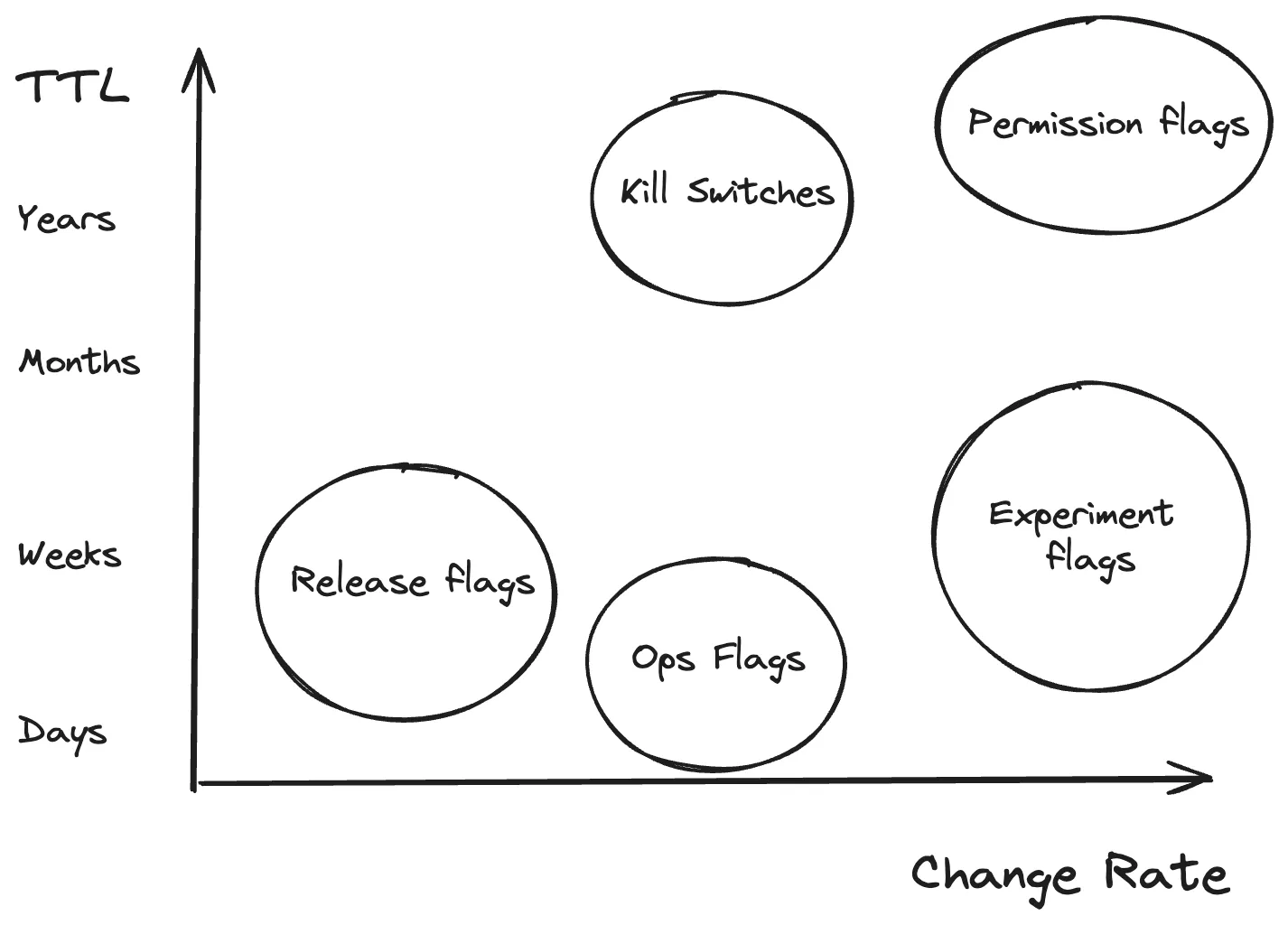
Let’s take a look at the different types of feature flags, including their purpose and benefits.
Release flags
Experiment flags
Kill switches
Operational flags
Permission flags
Sunset flags
- Purpose: Manage the deployment of new or incomplete features.
- Benefits: Risk mitigation, incremental development and testing of new features.
- Lifespan: Short-lived; a few weeks or months depending on the feature’s scope.
Release flags enable teams to integrate code into the mainline without immediately exposing it to all users. This practice supports continuous integration and delivery by always keeping the main branch deployable. They allow for incremental development and testing of features in production without impacting the entire user base, thereby enhancing stability and reliability.
While release flags are invaluable, they should be short-lived to prevent codebase complexity and technical debt accumulation. Once the feature is complete and tested, the flag should be removed to streamline the code.
Use cases for feature flags
Next, let’s look at some of the common use cases for feature flags, such as progressive rollouts, A/B testing, kill switches, and more.
Progressive rollouts
Progressive rollouts of features—where new functionality is gradually exposed to a broader audience based on successful interim outcomes—are much better than all-or-nothing releases. This phased approach allows for collecting valuable user feedback and performance data at each stage, enabling fine-tuning or course corrections as needed.
For example, a cloud storage service might initially introduce a new file-sharing interface to a small percentage of users, expanding the rollout as confidence in the feature’s stability and usability grows. The alternative is super long testing cycles that might still miss some bugs. It is much better to ship code quickly and start with a small audience that you can validate before rolling out more broadly.
A/B testing
Feature flags facilitate A/B testing by allowing different user segments to experience an app without a particular feature, or different variants of a feature. By directing different user segments to experience variant features, data can be gathered to inform which version effectively achieves the desired objectives.
An online bookstore, for instance, could test two different landing page designs to identify which one yields a higher engagement rate or increases sales, thereby making data-driven decisions to enhance user experience and business outcomes.
Kill switches
Feature flags can be used to quickly disable a feature as needed, minimizing the impact on both users and the organization deploying the feature.
To implement kill switches, a good general practice is to wrap your flaky feature in an inverted feature flag. Your application should assume that the feature is working as expected as long as the feature flag is disabled. When you disable a flag by default, your application will still have the feature enabled. This is in case it can’t fetch the latest version of the feature flag. If you detect any problems with the integration, you can then easily turn on the kill switch, which will then turn off the feature.
Rollbacks
Feature flags enable rapid rollbacks of features that are causing issues or not performing as expected. Instead of redeploying the entire application, teams can simply disable the problematic feature, reducing downtime and mitigating risk. Imagine a scenario where a new image compression algorithm is causing longer page load times; a feature flag can quickly disable this algorithm, reverting to the previous state while the issue is investigated.
Trunk-based development
Trunk-based development is a software development strategy where all developers commit code changes to a single shared branch, known as the “trunk” or “mainline,” rather than working in separate branches for extended periods. Feature flags support trunk-based development by allowing features to be integrated into the main codebase without being immediately visible to users. This encourages continuous integration and reduces the complexity associated with long-lived feature branches.
Developers have shifted towards trunk-based development for several reasons, primarily driven by the need for faster, more efficient, and more reliable software delivery processes. Feature flags allow teams to merge code for incomplete features into the trunk without exposing these features to all users. This way, you can continue developing and testing in production-like environments without affecting end-user experience.
Feature management
Feature management involves the strategic use of feature flags to control the lifecycle and rollout of features. This includes scheduling feature releases, managing access based on user roles, and monitoring feature performance and usage. Effective feature management ensures that new features are released in a controlled and measured manner, reducing risks and improving overall product stability.
Additionally, feature flags can be implemented in a secure and scalable manner to support enterprise-level requirements. By using robust feature flagging systems, organizations can ensure that their feature management processes comply with security standards and can scale to handle large user bases without compromising performance.
Compliance with FedRAMP, SOC 2, ISO27001, Air-gap, and others
Feature flags can be managed in environments that require strict compliance with standards such as FedRAMP, SOC 2, ISO27001, and air-gap configurations. By ensuring that feature flagging systems meet these regulatory requirements, organizations can maintain compliance while benefiting from agile feature management.
Feature flags and FeatureOps
Feature flags are a technique. FeatureOps is the discipline of controlling software behavior at runtime, built around feature flags and the practices that make them effective at scale.
DevOps focuses on getting code to production reliably. FeatureOps extends that focus into what happens after deployment: which users see which features, when they see them, and how to respond when something goes wrong. Deploying code and releasing a feature are separate concerns, and FeatureOps provides the practices and tooling to manage that distinction at scale.
The discipline rests on four pillars:
- Controlled release: Separate code deployment from feature exposure. Code reaches production on your deployment schedule, but features become visible to users through gradual rollouts rather than all-or-nothing launches.
- Full-stack experimentation: Treat every release as an opportunity to measure impact across the entire stack—performance, stability, infrastructure costs, and business metrics—not just surface-level UI changes.
- Surgical rollback: When something breaks, disable the problematic feature in seconds with a kill switch rather than redeploying the entire application. With the right observability in place, rollbacks can trigger automatically when error rates or latency cross defined thresholds.
- Zero-trust governance: Apply the same rigor to runtime changes that DevOps brought to deployment. Role-based access controls, approval workflows, and audit logs ensure that speed and governance coexist.
Autonomous releases
With autonomous release management, releases, experiments, kill switches, and other production changes happen based on real production data you define, so teams stay in control without sacrificing speed.
In an autonomous release workflow, a feature is wrapped in a flag and rolls out gradually while production signals like error rates, latency, and adoption are monitored against defined thresholds. If metrics stay healthy, the rollout progresses automatically to the next stage. If any signal crosses a safety threshold, the rollout pauses or rolls back instantly. After full rollout, stale flags are detected and cleaned up. The entire lifecycle operates within guardrails you define, without requiring manual toggling or constant monitoring.
Applying feature flag best practices with Unleash
High-stakes releases, complex branching strategies, and slow rollback paths were tolerable when change was infrequent. Today, they actively constrain velocity and amplify risk. When developers are forced to work this way, innovation is reduced by 50%. On average, application downtime costs organizations $400,000 per hour, and more than half of organizations face unexpected downtime every two months.
Unleash is the FeatureOps platform that gives teams real-time control over how software behaves in production, enabling controlled releases, full-stack experimentation, and surgical rollbacks at scale. Built on an open-source foundation with thousands of production deployments worldwide, Unleash is trusted by enterprises including Visa, Wayfair, Lloyd’s Banking Group, and Samsung. Governance, access controls, auditability, and data residency are built into the platform, so teams can move fast without compromising control.
If you want to learn more about how to implement feature flags at scale, check out the following resources:
- Feature Flag Tutorials
- Best practices for using feature flags at scale
- Best practices for building and scaling feature flags
- Try Unleash for Free
FAQs about feature flags
How do feature flags differ from feature branches?
Feature flags allow developers to merge code into the main codebase while keeping the functionality hidden from end users. Feature branches isolate code in separate environments until it is fully complete, which can often lead to difficult merge conflicts and delayed feedback. By using feature flags, teams can separate code deployment from feature release, avoiding the “merge mayhem” often associated with long-lived branches.
Can feature flags be used for A/B testing?
Yes. Feature flags are an essential tool for conducting feature experimentation like A/B tests and multivariate experiments directly in a live production environment. They allow you to segment your user base and serve different feature variations to specific groups to measure engagement and performance. This data-driven approach enables product teams to validate hypotheses and optimize user experiences before committing to a full rollout.
What is the role of feature flags in trunk-based development?
Trunk-based development requires developers to commit code frequently to a single shared branch, often called the “trunk” or “main.” Feature flags support this workflow by wrapping incomplete code in conditional statements, ensuring it remains inactive in production until it is ready. This allows teams to practice continuous delivery without exposing unfinished features or breaking the user experience.
What are the risks of using feature flags?
The primary risk associated with feature flags is the accumulation of technical debt if flags are not removed after they have served their purpose. Old or stale flags can clutter the codebase, making it harder to maintain and test, potentially leading to unexpected behaviors if configurations interact poorly. To mitigate this, teams should establish a strict lifecycle management process to retire flags once a feature is fully released or an experiment concludes. A common practice is automating flag clean-up using coding assistants or the Unleash MCP server.
Who is responsible for managing feature flags?
While developers typically implement the initial code for a flag, the management of the flag often shifts depending on its type and lifecycle stage. Engineering teams usually control operational flags and kill switches, for example, while product managers often control release and experiment flags. Collaborative feature management platforms allow both technical and non-technical stakeholders to control flag configuration safely.
What is FeatureOps?
FeatureOps is the discipline of controlling software behavior at runtime. It extends DevOps into the layer where features reach users, combining runtime control, progressive delivery, observability, and governance. Where DevOps focuses on getting code to production, FeatureOps focuses on controlling what happens after code is deployed—who sees which features, when, and with what safeguards in place. Feature flags are the core mechanism, but FeatureOps encompasses broader practices including autonomous releases, full-stack experimentation, and zero-trust governance.
What are autonomous releases?
Autonomous releases are self-regulating rollout workflows driven by production data rather than manual intervention. A feature rolls out gradually while production signals like error rates, latency, and adoption are monitored against defined thresholds. If metrics stay healthy, the rollout progresses automatically. If any signal crosses a safety threshold, the rollout pauses or rolls back instantly. After full rollout, stale flags are cleaned up. This approach is especially valuable as AI coding tools increase the volume and velocity of code changes.