

Trunk-based development with feature flags
In trunk-based development, developers collaborate on a single branch, the trunk, and merge small changes into it at least once a day. Branches, where they exist at all, live for hours rather than weeks. DORA’s research associates this way of working with higher software delivery performance: teams that keep three or fewer active branches and merge to trunk daily ship faster and more reliably than teams that batch work into long-lived branches.
Merging daily has an unavoidable consequence: unfinished features land on the trunk, and with continuous delivery they land in production. Feature flags are what make that safe. A flag keeps the unfinished code path hidden until the feature is ready, so the trunk stays releasable at every commit and the release becomes a separate, controlled decision.
This guide covers:
- Why teams move to trunk-based development and the two common ways to practice it.
- How feature flags hide unfinished work and decouple deployment from release.
- The workflow with Unleash, from creating a release flag to rolling the feature out.
- Practices that keep the trunk releasable, instant rollback, and retiring flags once features are fully rolled out.
Why teams move to trunk-based development
Integration pain scales with branch lifetime. A branch that lives for weeks drifts away from the code everyone else is changing, so it ends in a large, conflict-prone merge that is hard to review and hard to test. Teams compensate with integration phases and code freezes, which slow delivery further. Trunk-based development removes the problem at its source: changes integrate continuously, so no branch ever drifts far enough to make merging risky.
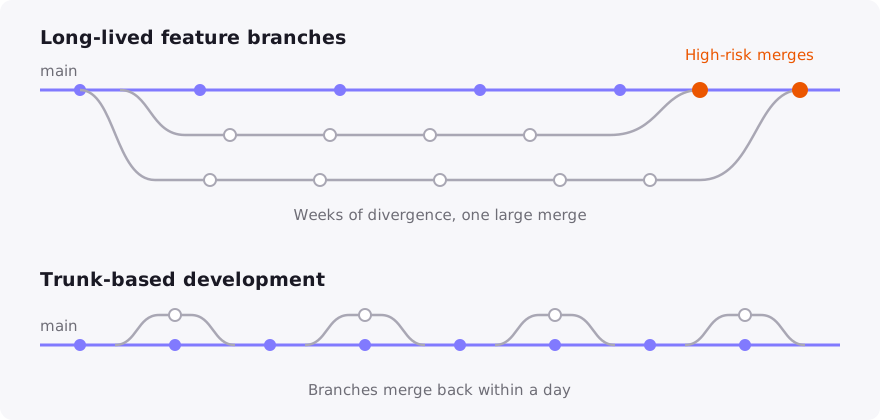
There are two common ways to practice it, and Unleash supports both:
Either way, the definition of done for a merge is the same: the trunk builds, passes its tests, and could be released. What trunk-based development deliberately gives up is the ability to hide unfinished work on a branch. That job moves to feature flags.
Hide unfinished work with feature flags
A feature rarely fits into a single day-sized merge, so on any given day the trunk contains features that are partly built. There are structural ways to keep them invisible: build the backend first and add the user interface as the final piece, which Martin Fowler calls a keystone interface, or swap implementations behind an abstraction using branch by abstraction.
A feature flag generalizes both techniques and adds something they can’t provide: runtime control. The unfinished code path merges and deploys with the flag off, and nobody can reach it. When the feature is complete, you release it by changing the flag, not by deploying code. GitHub’s feature flag write-up describes the payoff: disabling a change takes seconds, where a rollback deployment takes minutes.
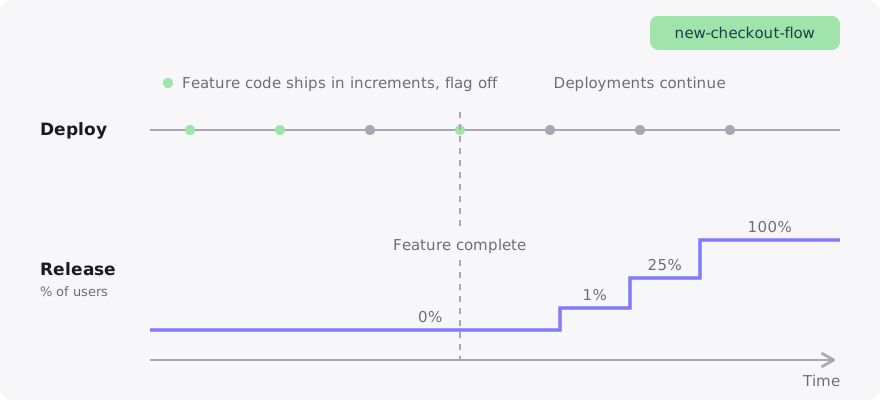
This separation of deployment from release is what makes trunk-based development sustainable in production. Deployment becomes routine and low-stakes because unreleased code changes nothing for users. Release becomes deliberate and reversible because it happens at runtime, per environment and per audience, under your control in Unleash.
Implement the workflow with Unleash
To follow this workflow you need an Unleash instance and an application connected through one of the SDKs. See the quickstart for setup options.
Create a release flag before writing code
In the Unleash Admin UI, open your project, click New feature flag, and choose the release flag type. Creating the flag first means the very first slice of the feature can merge behind it.
Give the flag a name that follows your project’s naming pattern, and use the description and tags to record who owns it and which ticket or feature it belongs to. Release flags are meant to be short-lived, and Unleash tracks each flag against its expected lifetime, so this metadata is what makes cleanup easy later.
Guard the new code path
Wrap the feature at a single seam, such as the function that chooses between the old and new behavior, rather than scattering flag checks through the code:
With the flag off in production, newCheckoutFlow can be merged in any state of completeness, as long as it compiles and its tests pass.
Merge small slices at least daily
Break the feature into merges of a day or less. Each merge must leave the trunk green: it builds, passes CI, and is releasable, because the incomplete feature is unreachable behind the flag. This is the discipline that replaces the isolation a long-lived branch used to provide.
Test the feature before release
Enable the flag in your development and testing environments while keeping it off in production. The same trunk, deployed everywhere, behaves differently per environment based on flag state, so you can exercise the feature end to end without exposing it to users. Use the playground to check exactly how the flag evaluates for a given context before you change anything in production.
Release with a gradual rollout
When the feature is complete, release it in stages instead of all at once: enable it for your own team first with a constraint on user ID or email domain, then ramp through a gradual rollout to 100%. Stickiness keeps each user on the same side of the flag as the percentage grows. If your team repeats the same release ladder for every feature, define it once as a release template and apply it to each flag.
Keep the trunk releasable
The workflow only holds up if the trunk stays trustworthy. The practices DORA identifies for successful trunk-based development are the same ones that make flag-guarded merging safe:
- Fast, automated builds and tests on every merge. A build that takes minutes, not hours, is what makes merging several times a day practical.
- Small batches, reviewed quickly. A diff produced in a few hours is reviewed in minutes. Waiting a day for review reintroduces the long-lived branch through the back door.
- No code freezes. If a change isn’t ready to be seen, that’s a flag decision, not a reason to stop integrating.
- As few flags per feature as possible. One flag guarding one seam is easy to reason about and easy to remove. If one feature seems to need many flags, that’s usually a sign to split the feature. For managing flags across many teams, see best practices for feature flags at scale.
Roll back in seconds without reverting commits
When a released feature misbehaves, the flag is the retreat. Turning it off in the production environment returns every user to the previous code path in seconds, with no revert commit, no rollback deployment, and no impact on the other changes that shipped alongside it. The blast radius is exactly one feature.
You can automate the retreat as well. Safeguards monitor your metrics during a release plan and pause the rollout automatically when a threshold is crossed, and signals with actions let your monitoring or CI systems disable a flag without waiting for a human.
Retire flags when the rollout is done
A release flag has done its job once the feature has held at 100% and you no longer need the option to turn it off. Leaving it in place after that is unmanaged technical debt: every stale flag is a dead branch in the code and an if statement someone eventually misreads. Unleash surfaces cleanup candidates through the feature flag lifecycle, which highlights flags that have completed their rollout but haven’t been archived.
To clean up a release flag safely:
- Confirm the feature is stable at 100% rollout and you no longer need the ability to turn it off quickly.
- Remove the flag check from your code, keeping only the new code path, and deploy that change.
- Archive the flag in Unleash. Archiving keeps the flag’s history, and you can revive it later if needed.
Remove the flag from your code before archiving it. If you archive a flag that is still referenced in code, isEnabled calls for it return the fallback value, which can silently switch users back to the old code path.
Make cleanup part of the feature’s definition of done, for example by creating the removal task at the moment a flag reaches 100% rollout. A trunk-based team creates flags constantly, so retiring them at the same rate is what keeps the codebase simple.
Frequently asked questions
How does code review work without long-lived branches?
Review still happens, it just happens fast and on small diffs. Most teams use short-lived branches with pull requests: the branch exists for hours, CI runs on it, a teammate reviews it the same day, and it merges. Teams that commit straight to trunk use pair programming or synchronous review instead. What trunk-based development rules out is review latency measured in days, because a branch waiting for review is a branch drifting from trunk.
Does every change need a feature flag?
No. Flags are for work that is user-visible and incomplete across merges, or that you want to release gradually or be able to turn off. Small refactors, bug fixes, and changes that are complete within a single merge go straight to trunk without a flag. Creating flags only where they earn their keep is what keeps flag cleanup manageable.
What if a feature takes weeks to build?
Build it as a sequence of small, flag-guarded merges rather than on a long-lived branch. The flag keeps the accumulating feature hidden in production the whole time, and each slice still integrates daily with everyone else’s work. Techniques like the keystone interface, where the user interface lands last, reduce how much of the feature ever needs to be reachable while unfinished.
Do we still need release branches?
Teams practicing continuous delivery typically release straight from trunk and fix forward, using flags for anything that needs to be withheld or withdrawn. If your process requires release branches, for example for versioned or packaged software, trunk-based development allows them as short-lived, cut-just-in-time branches that are never merged back into. Feature flags reduce how often you need one, because withholding a feature no longer requires excluding its code from the release.