

API tokens and client keys
Overview
Unleash uses API keys to facilitate communication between consuming clients such as SDKs, Unleash Edge, or other tools and automation.
Unleash supports the following types of API tokens:
- Backend tokens for connecting backend SDKs or Unleash Edge to Unleash.
- Frontend tokens for connecting frontend SDKs to Unleash using the Frontend API or Unleash Edge.
- Personal access tokens for testing and debugging or providing temporary access to an automation tool.
- Service account tokens for providing API access to integrations or automation tools.
To connect a frontend SDK to Unleash using Unleash Edge, you need both a backend and frontend token. See Connect a frontend SDK to Unleash using Edge for an example.
API token types
Backend tokens
Backend tokens are intended for use in backend SDKs or Unleash Edge to grant the permissions to:
- Reading feature flag information
- Registering applications with the Unleash server
- Sending usage metrics
Backend tokens are scoped to one or more projects and a single environment. When creating a backend token, you can give it access to a specific list of projects or to all current or future projects. Backend tokens are secrets and must not be exposed to end users.
Backend tokens cannot be used in frontend SDKs; use frontend tokens instead.
Frontend tokens
Use frontend tokens for connecting frontend SDKs to Unleash using the Unleash Frontend API or Unleash Edge. They grant the user permission to:
- Reading enabled flags for a given context
- Registering applications with the Unleash server
- Sending usage metrics
Frontend tokens are scoped to one or more projects and a single environment. When creating a frontend token, you can give it access to a specific list of projects or to all current or future projects. Frontend tokens are not considered secret and are safe to expose client-side.
Frontend tokens cannot be used in backend SDKs; use backend tokens instead.
Personal access tokens
Personal access tokens reflect the permissions of the user who creates them. If the user’s permissions change, such as through the addition of a custom role, the token automatically updates to match the new permissions. You can use personal access tokens for testing, debugging, or giving temporary access to automation tools.
When you use a personal access token to modify resources, the events record the token creator’s name for that operation.
Personal access tokens with a lifetime expire and stop working after their expiration date. Although you can set the token to not expire, we recommend using tokens with expiration dates to follow security best practices.
Personal access tokens are not suitable for use in SDKs, as they are not bound to an environment, they may expire, or their permissions may change.
Service account tokens
Service account tokens provide API access to integration and automation tools. To learn more, go to Service Accounts.
Admin tokens
Admin tokens are deprecated. Use other token types:
- With Open Source; use personal access tokens.
- With Enterprise; use service accounts.
Admin tokens grant full read and write access to all resources in the Unleash server API. This includes all projects, all environments, and all root resources.
API token permissions
The following table provides a summary of what actions different roles can perform with API tokens:
API token format
API tokens consist of three parts:
- Project information
- Environment
- Hash
The parts are separated by two delimiters: a colon (:) between the projects and the environment, and a period (.) between the environment and the hash.
The project value of the token can be one of:
- A single project ID, for example,
default: when the token can only access a single project. []: when the token is valid for a specific set of projects. The list of projects is not shown in the token.*: when the token is valid for all current and future projects.
The environment value of the token is the name of an environment on your Unleash instance, such as development. The hash is a 64-character-long hexadecimal string.
Personal access tokens start with the string user, and do not contain additional project or environment information.
Some example API tokens are:
- A token with access to the
developmentenvironment of a single project,new-checkout-flow: - A token with access to the
productionenvironment in multiple projects: - A token with access to the
developmentenvironment in all current and future projects: - A personal access token:
Note, in Unleash v4.3 or less, API tokens are a 64-character-long hexadecimal string with no additional information. For example:
Create an API token
Depending on your permissions, you can create API tokens in the Unleash Admin UI in four ways:
- Admin settings > Access control > API access: for backend or frontend tokens; requires the Admin root role, or a custom root role with API token permissions.
- Admin settings > Service accounts > New service account: for creating a service account and assigning a token.
- Settings > API access inside a project: for project-specific backend or frontend tokens; permitted for project Members or users with a corresponding root role.
- Profile > View profile settings > Personal API tokens: for personal access tokens.
Token expiry and rotation
Requests with an expired token are rejected, so rotate tokens before they expire. How you set a token’s expiration date depends on the token type:
For backend and frontend tokens, we recommend rotating tokens on a regular schedule rather than setting an expiration date. This keeps token hygiene in your control without the risk of a token expiring unnoticed.
A token’s access configuration, that is its type, projects, and environment, cannot be changed after creation. Unleash does not rotate tokens automatically.
Rotate a token
To rotate a token:
- Create a new token with the same type, project, and environment scope.
- Update your SDKs and integrations to use the new token.
- Delete the old token once nothing is using it.
Expiration notifications
BetaUnleash notifies you before a service account token or personal access token expires. The token’s creator receives an email ahead of the expiration date, giving you time to rotate the token before your automations and integrations lose access.
Connect a frontend SDK to Unleash using Edge
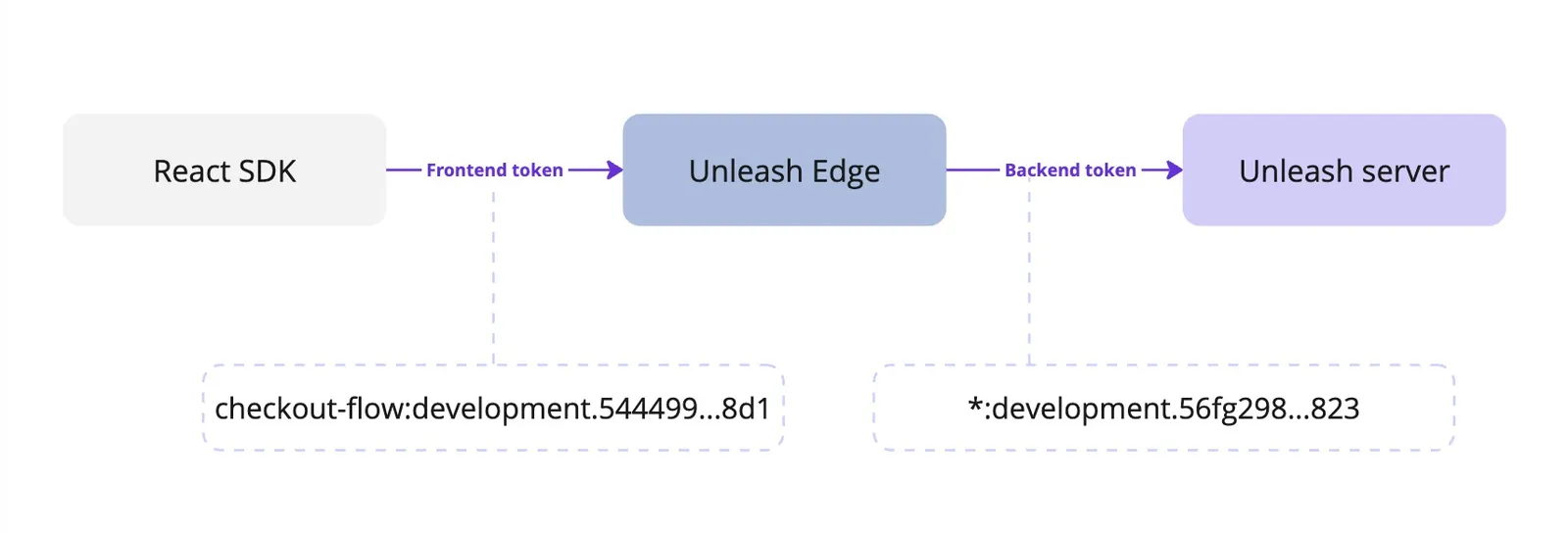
To connect a frontend SDK to Unleash using Unleash Edge, you need both a backend and frontend token:
- The frontend SDK needs a frontend token to communicate with Edge.
- Edge needs a backend token to communicate with the Unleash server.
Ensure that the backend token has at least the same project and environment scope as the frontend token.
Proxy client keys
Unleash Proxy is in maintenance mode. Use Unleash Edge instead.
You can use proxy client keys to connect frontend SDKs to Unleash Proxy. Proxy client keys are not considered a secret and are safe to expose client-side.
Proxy client keys are arbitrary strings that you provide the Unleash proxy with on startup. They can be any string you choose, and you create them yourself.
Creating proxy client keys
To designate a string as a proxy client key, add it to the clientKeys list when starting the proxy. Connecting clients should then specify the same string as their client key.
Proxy client keys cannot be used to connect to the Unleash API; use API tokens instead.