

Unleash hosting options
Unleash provides flexible hosting options for Unleash and Unleash Edge, allowing you to meet specific requirements for scaling, privacy, and infrastructure control. This document covers the main hosting models for the Unleash API server and Unleash Edge. Choosing a hosting model is a key architectural decision.
Before considering hosting options, we recommend that you explore the Unleash architecture and its key components.
The availability of hosting options may depend on your plan. See the Unleash Pricing page for details.
Cloud-hosted
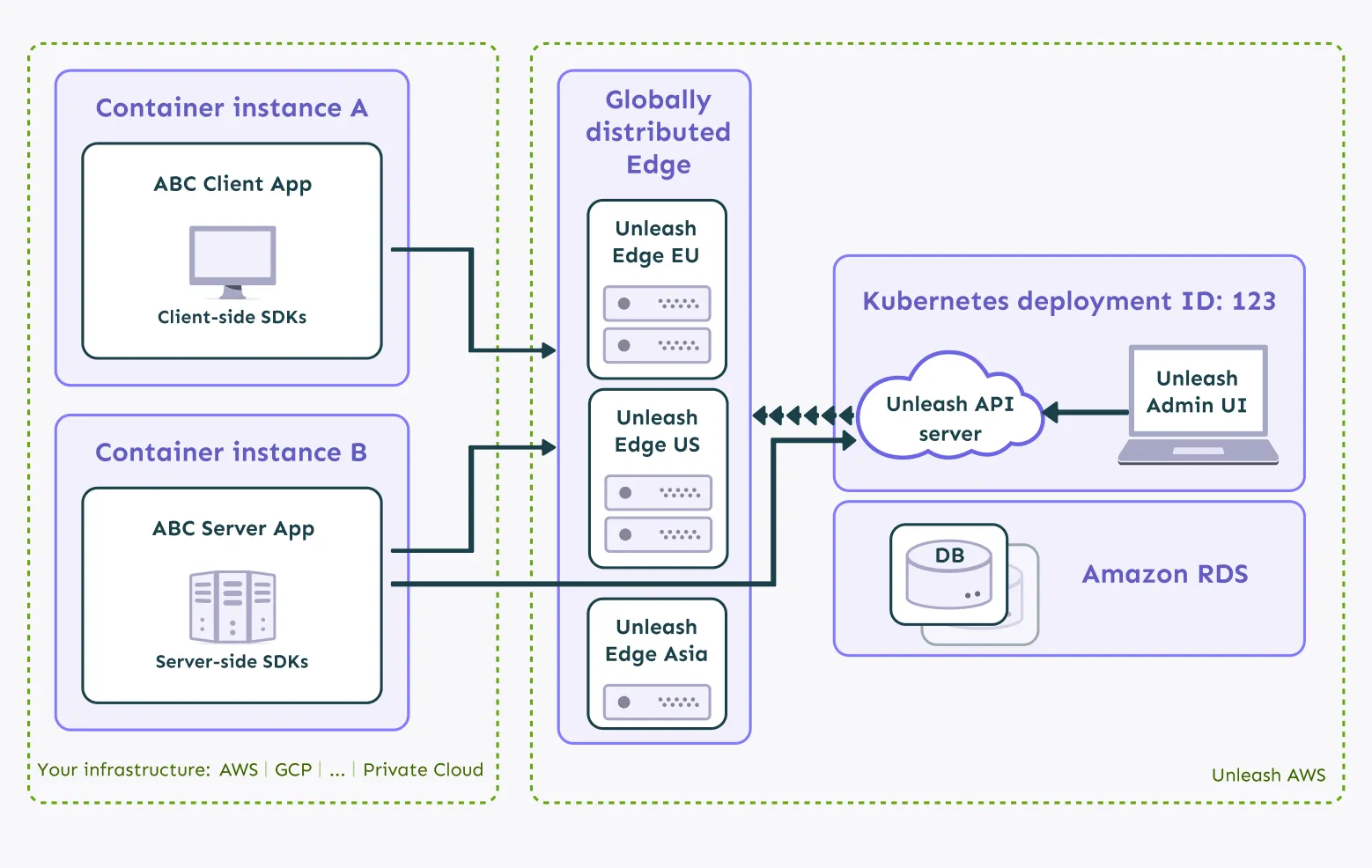
In this setup, Unleash manages the infrastructure for both the Unleash API server and Unleash Edge.
Unleash Cloud
This fully-managed solution is designed for high availability, featuring the following key aspects:
- Multi-AZ deployments: Services are deployed across multiple Availability Zones (AZs) within a region. This means that your data and applications are distributed across different physical locations, reducing the risk of downtime due to localized failures.
- Hot standby replica: A continuously synchronized replica database stands ready in a separate AZ to take over if the primary database fails.
- Automatic failover: The system automatically detects AZ failures and fails over to the standby replica with minimal disruption.
- Disaster recovery: Full backups are stored in a separate region. A standby Unleash cluster in the backup region can take over in the rare event of a complete primary region failure.
- CDN for static assets: The Admin UI and static resources are served via a global Content Delivery Network (CDN) for fast loading times worldwide.
Unleash Enterprise Edge Cloud
Unleash Enterprise Edge, our cloud-hosted Edge offering, provides enterprise-grade security, full observability, streaming, and multi-region redundancy. Here are the key aspects of the offering:
- Multi-AZ deployments: Edge instances run across at least two AZs within each region.
- Multi-region deployment: Edge is available in multiple global regions. SDKs automatically connect to the nearest available region. Traffic fails over to other regions if one region becomes unavailable.
- Resilience: Edge caches flag configurations locally. SDKs connected to Edge can continue evaluating flags even if the connection to the primary Unleash API server is temporarily lost.
- Scalability and performance: Edge acts as a read-only cache, handling numerous SDK connections. Instead of relying on periodic polling, Edge and the Unleash server use a high-speed streaming protocol to sync flag changes in milliseconds.
Enterprise Edge is available in the following 17 global data centers across North and South America, Europe, and Asia, allowing you to achieve low latency, high resilience, and optimal performance:
US:
- us-east-1 (Virginia)
- us-east-2 (Ohio)
- us-west-1 (N. California)
- us-west-2 (Oregon)
Europe:
- eu-central-1 (Frankfurt)
- eu-west-1 (Ireland)
- eu-west-2 (London)
- eu-west-3 (Paris)
- eu-north-1 (Stockholm)
Asia:
- ap-south-1 (Mumbai)
- ap-northeast-3 (Osaka)
- ap-northeast-2 (Seoul)
- ap-northeast-1 (Tokyo)
- ap-southeast-1 (Singapore)
- ap-southeast-2 (Sydney)
Canada:
- ca-central-1 (Central)
South America:
- sa-east-1 (São Paulo)
Hybrid
In this hybrid model, Unleash hosts the API server and Admin UI, while you host Unleash Enterprise Edge instances yourself. You run Edge as a container within your own infrastructure, close to your applications. This gives you control over Edge’s location and its network environment. Unleash manages the Unleash API, the Admin UI, and the backing database in our AWS setup; the API and the UI run together in a Kubernetes deployment and connect to an Amazon RDS database.
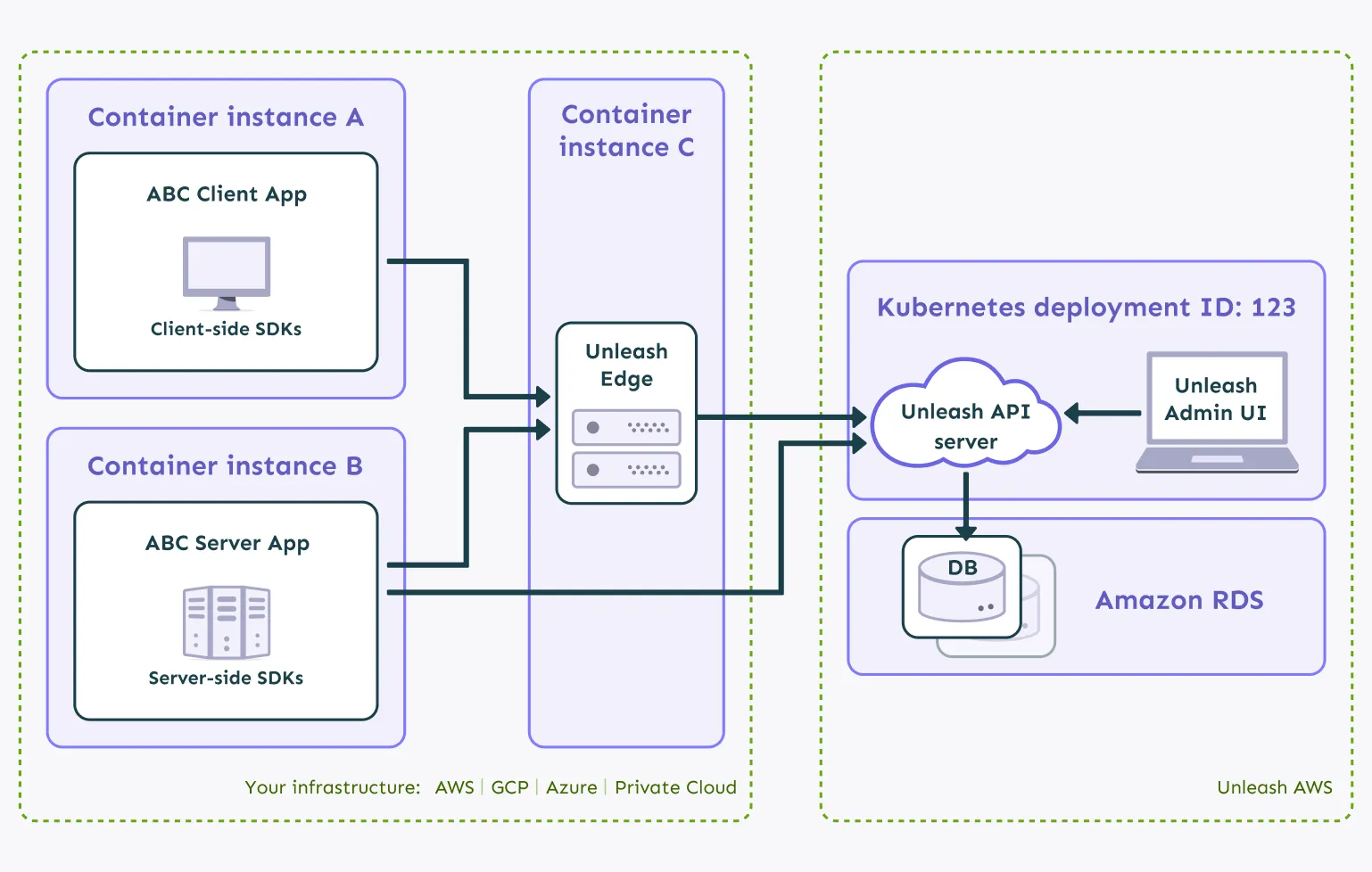
In this setup, you need to configure Edge and the SDKs.
Configure Edge
Set the UPSTREAM_URL environment variable to your Unleash instance URL (e.g., https://<your-instance>.app.unleash-hosted.com/api):
- Provide the Backend API tokens using the
TOKENSenvironment variable. This allows Edge to fetch the correct flag configurations on startup. - Run the Edge container. Example using Docker:
- To add configurations for other projects/environments dynamically after startup, you can send an authorized request to Edge using a different Backend API token:
Configure the SDKs
Point your SDKs to your self-hosted Edge instance’s URL.
- Backend SDKs: Use the
/api/clientendpoint and a Backend token. Edge returns the full flag configuration for the token’s scope. - Frontend SDKs: Use the
/api/frontendendpoint and a Frontend token. Edge evaluates flags based on the context provided by the SDK and returns only the evaluated feature flags.
Self-hosted
In this model, you host and manage all components: the Unleash API server, the database, the Admin UI, and Unleash Enterprise Edge instances.
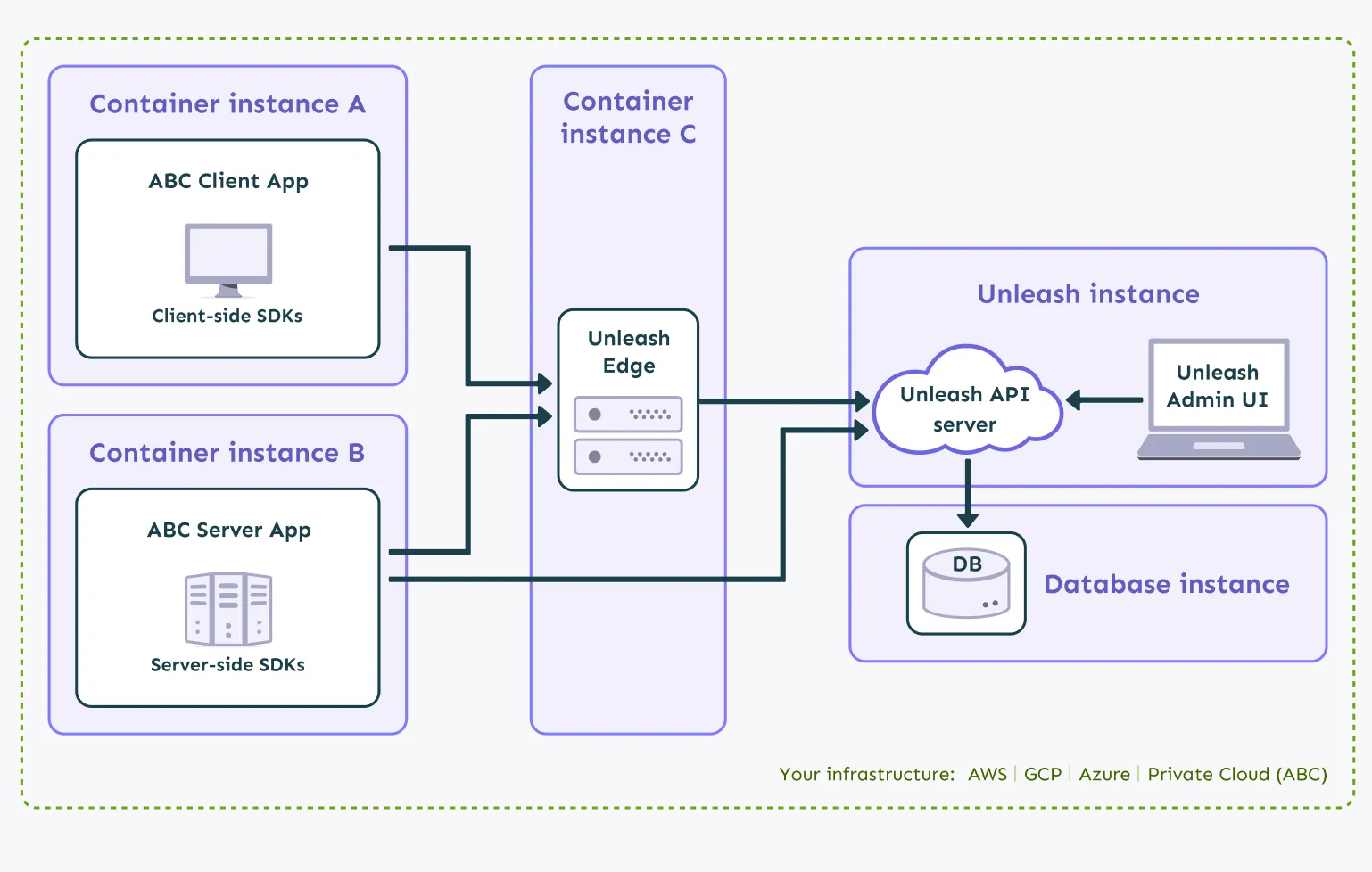
This option offers maximum flexibility and control over your feature management infrastructure but requires the most operational effort.
In addition to configuring Edge, you must also set up the Unleash server and its database following our self-hosting guide.
Unleash Edge options
Unleash Enterprise Edge: Hosted vs. Self-Hosted
The following table compares the operational differences between using Unleash Enterprise Edge Hosted and Unleash Enterprise Edge Self-hosted.
Using Unleash without Edge
Using Unleash Edge is optional. You can also access the Unleash API directly using the Frontend or Client API. This setup comes with the following considerations:
- Fair Use Policy: Sending requests to the Unleash API is subject to limits outlined in the Fair Use Policy. While short traffic spikes are accommodated, sustained high traffic might require using Unleash Edge.
- Latency: Although the Unleash architecture is designed for incredibly fast flag evaluations thanks to caching in the SDKs, the central Unleash API server might not be geographically close to all your end users, potentially increasing flag evaluation latency.
- Data privacy: When using the Frontend API to talk to Unleash, any end-user data included in the Unleash Context is sent directly to the Unleash server. Evaluate if this meets your privacy requirements. Using Edge avoids sending this context data directly to the central Unleash API server.