For AI agents: a documentation index is available at the root level at /llms.txt and /llms-full.txt. Append /llms.txt to any URL for a page-level index, or .md for the markdown version of any page.
13.5kProductPricingSign inStart free trialBook a demo
DocsAPIsSDKsEnterprise EdgeGuidesAcademyRelease notes
    • Home
  • Get started
    • Quickstart
    • Introduction to feature flags
    • Unleash architecture overview
  • Core concepts
    • Overview
      • Login history
      • Banners
      • Command menu
      • Search
      • Maintenance mode
    • Import and export

Unleash reduces the risk of releasing new features, drives innovation by streamlining the software release process, and increases revenue by optimizing end-user experience. While we serve the needs of the world's largest, most security-conscious organizations, we are also rated the “Easiest Feature Management system to use” by G2.

GitHubGitHubLinkedInLinkedInX (Twitter)X (Twitter)SlackSlackStack OverflowStack OverflowYouTubeYouTube

Server SDKs

  • Node.js
  • Java
  • Go
  • Rust
  • Ruby
  • Python
  • .NET
  • PHP
  • All SDKs

Frontend SDKs

  • JavaScript
  • React
  • Next.js
  • Vue
  • iOS
  • Android
  • Flutter

Feature Flag use cases

  • Secure, scalable feature flags
  • Rollbacks
  • FedRAMP, SOC2, ISO2700 compliance
  • Progressive or gradual rollouts
  • Trunk-based development
  • Software kill switches
  • A/B testing
  • Feature management
  • Canary releases

Product

  • Quickstart
  • Unleash architecture
  • Pricing
  • Product vision
  • Open live demo
  • Open source
  • Enterprise feature management platform
  • Unleash vs LaunchDarkly

Support

  • Help center
  • Status
  • Changelog
Made in a cosy atmosphere in the Nordic countries.Copyright © 2026 Unleash
LogoLogo
13.5kProductPricingSign inStart free trialBook a demo
On this page
  • Search Bar
  • Search Filters Supported
  • Filter Flexibility
  • API Support for Search
Core conceptsAdmin UI

Search

||View as Markdown|
Was this page helpful?
Previous

Maintenance mode

Next
Built with
v5.9

Search with filters/operators is a feature that allows users to conduct flexible data filtering. This feature is currently available on two specific pages: the Global Features Page and the Project Page.

Search Bar

Location: The search bar is located at the top of the Global Features Page and the Project Page.

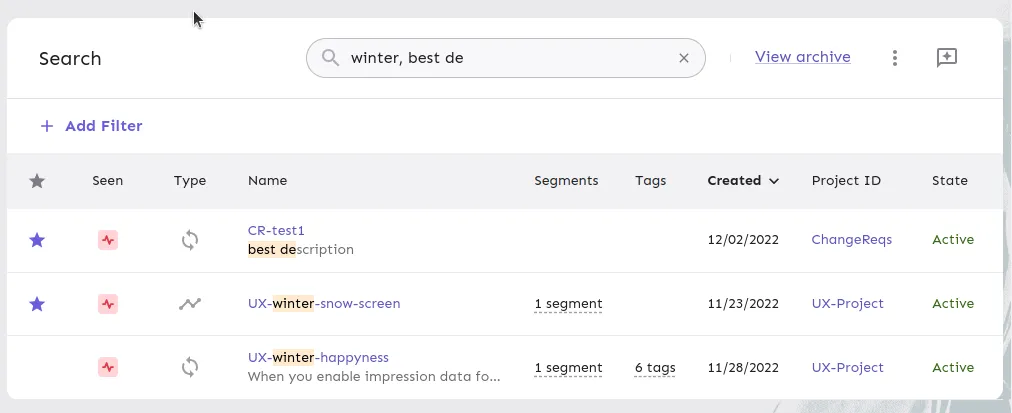
Functionality: It enables users to conduct searches for features using text. This is a full-text search that includes both feature names and feature descriptions.

Multiple Keywords: To search for multiple keywords, separate them with a comma. When searching with multiple keywords, there is effectively an OR condition between them, so the search will match items that contain either of the keywords. However, be aware that texts containing commas cannot be effectively searched, as the comma is used as a separator.

The search bar, using multiple keywords

Search Filters Supported

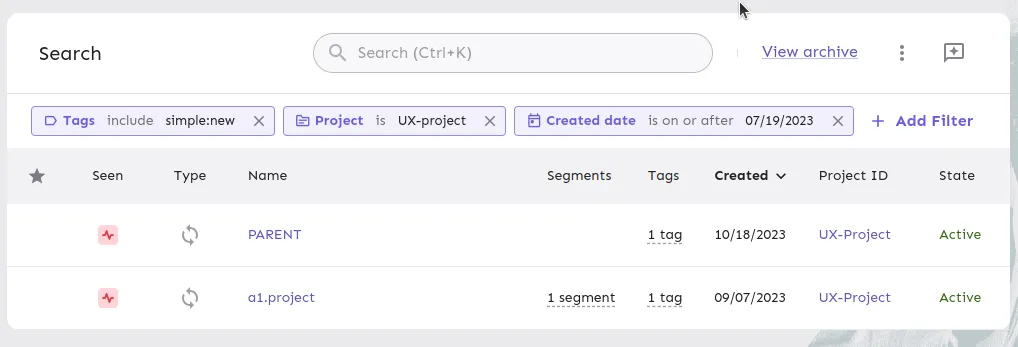
The search functionality supports five filters:

  1. Created Date: Allows filtering based on the creation date of features.
  2. Project: Allows filtering by specific projects.
  3. Segment: Allows filtering based on segments.
  4. State: Allows filtering by the state of features.
  5. Tags: Allows filtering using selected tags.

Filter Flexibility

  • Created Date: Supports single value selection with two operators:

    • On or After: Filters features created on or after a specific date.
    • Is Before: Filters features created before a specific date.
  • Project: Allows single or multiple value selections with these operators:

    • Is: Filters features belonging to a specific project.
    • Is Not: Excludes features from a specific project.
    • Is Any Of: (For multiple selections) Includes features from any of the selected projects.
    • Is None Of: (For multiple selections) Excludes features from all the selected projects.
  • Segment and Tags: These filters offer similar operators:

    • Include: Filters features that include specific segments or tags.
    • Do Not Include: Excludes features with specific segments or tags.
    • Include All Of: (For multiple selections) Filters features that include all specified segments or tags.
    • Include Any Of: (For multiple selections) Filters features that include any of the specified segments or tags.
    • Exclude If Any Of: (For multiple selections) Excludes features if they include any of the specified segments or tags.
    • Exclude All: (For multiple selections) Excludes features that include all specified segments or tags.
  • State: Supports two values—Active or Stale—with two operators:

    • Is: Filters features that are either active or stale.
    • Is Not: Excludes features that are either active or stale.

The search filters, using operators

API Support for Search

In addition to the user interface, Search with Operators is also supported through the API. All the filters and operators function identically to their counterparts in the UI, ensuring a consistent experience between the API and user interface.

Refer to the Search API for full details: