

For AI agents: a documentation index is available at the root level at /llms.txt and /llms-full.txt. Append /llms.txt to any URL for a page-level index, or .md for the markdown version of any page.
13.5kProductPricingSign inStart free trialBook a demo
DocsAPIsSDKsEnterprise EdgeGuidesAcademyRelease notes
    • Home
  • Get started
    • Quickstart
    • Introduction to feature flags
    • Unleash architecture overview
  • Core concepts
    • Overview
      • Impression data
      • Events
      • Playground
      • Network
      • Enterprise Edge observability
    • Import and export

Unleash reduces the risk of releasing new features, drives innovation by streamlining the software release process, and increases revenue by optimizing end-user experience. While we serve the needs of the world's largest, most security-conscious organizations, we are also rated the “Easiest Feature Management system to use” by G2.

GitHubGitHubLinkedInLinkedInX (Twitter)X (Twitter)SlackSlackStack OverflowStack OverflowYouTubeYouTube

Server SDKs

  • Node.js
  • Java
  • Go
  • Rust
  • Ruby
  • Python
  • .NET
  • PHP
  • All SDKs

Frontend SDKs

  • JavaScript
  • React
  • Next.js
  • Vue
  • iOS
  • Android
  • Flutter

Feature Flag use cases

  • Secure, scalable feature flags
  • Rollbacks
  • FedRAMP, SOC2, ISO2700 compliance
  • Progressive or gradual rollouts
  • Trunk-based development
  • Software kill switches
  • A/B testing
  • Feature management
  • Canary releases

Product

  • Quickstart
  • Unleash architecture
  • Pricing
  • Product vision
  • Open live demo
  • Open source
  • Enterprise feature management platform
  • Unleash vs LaunchDarkly

Support

  • Help center
  • Status
  • Changelog
Made in a cosy atmosphere in the Nordic countries.Copyright © 2026 Unleash
LogoLogo
13.5kProductPricingSign inStart free trialBook a demo
On this page
  • View your Edge observability dashboard
  • Metrics and information
  • Instance details
  • Instance health
  • Traffic and performance
Core conceptsTesting and monitoring

Enterprise Edge observability

||View as Markdown|
Was this page helpful?
Previous

Applications

Next
Built with
v7.4 Enterprise

Enterprise Edge observability provides deep visibility into the health and performance of your Unleash Edge nodes directly within the Admin UI.

This feature enables you to monitor the real-time state of every connected Edge instance, helping you identify bottlenecks, verify regional deployments, and ensure your Edge nodes are properly synced.

View your Edge observability dashboard

To access the Enterprise Edge observability dashboard, go to Admin settings > Enterprise Edge in the Unleash Admin UI.
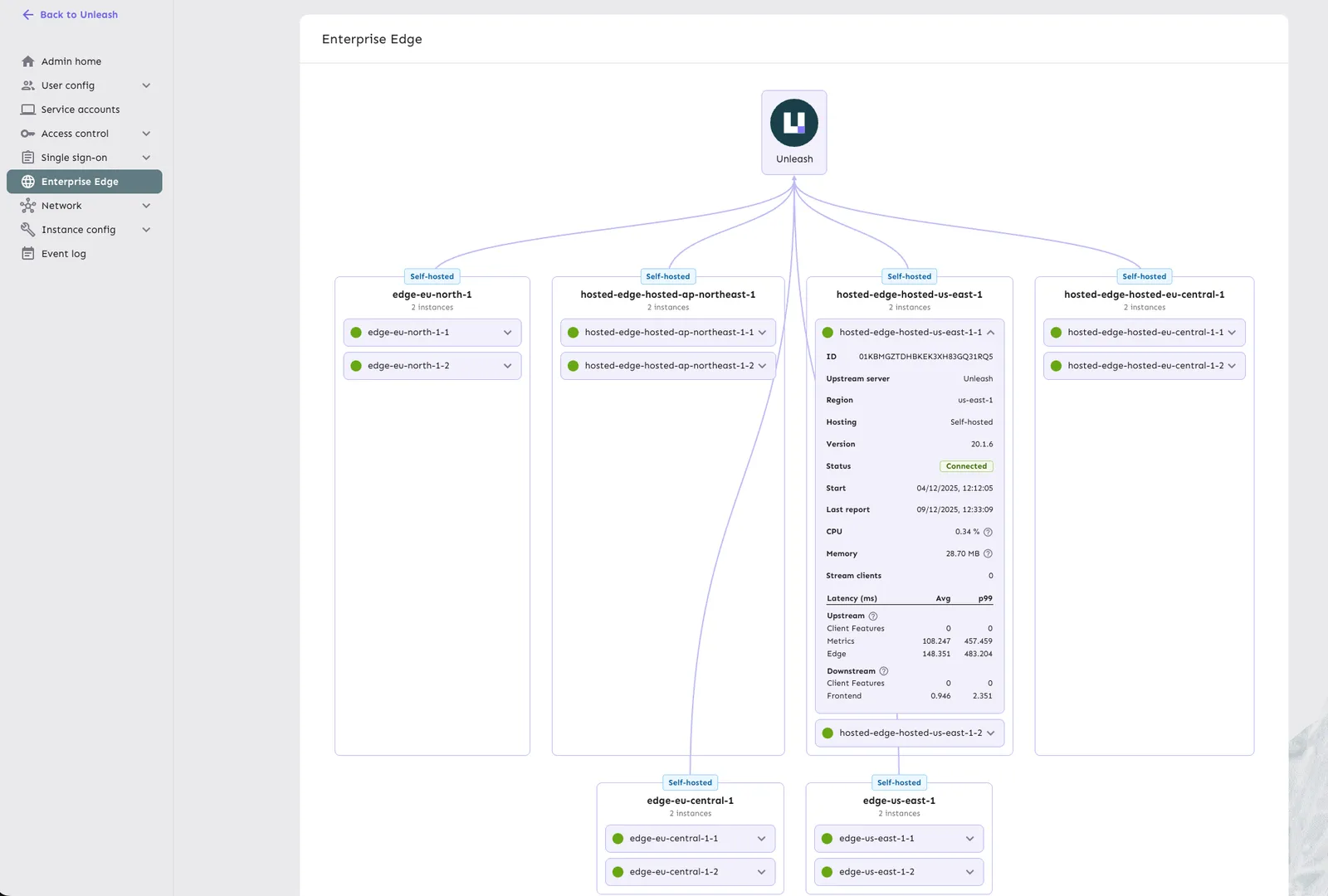
Edge observability dashboard

Metrics and information

The dashboard reports the following metrics for each Edge node:

Instance details

  • Region: The hosting region where the Edge instance is deployed.
  • Instance ID: Unique identifier for the Edge instance.
  • Upstream server: Whether the instance connects to Unleash or another Edge node.
  • Hosting type: Whether the instance is hosted (managed by Unleash) or self-hosted (managed by you).

Instance health

  • Status: Current connection state (for example, Connected) with start time and last reported connection.
  • Version: The running version of the Edge binary.
  • Resources: Real-time CPU and memory usage.

Traffic and performance

  • Stream clients: Number of SDKs currently maintaining a streaming connection to this Edge instance.
  • Upstream latency: Time taken to fetch updates from the upstream Unleash server, broken down by:
    • Client Features
    • Metrics
    • Edge sync
  • Downstream latency: Time taken to serve requests to connected SDKs, broken down by:
    • Frontend evaluations
    • Backend evaluations

These metrics help you identify performance bottlenecks, verify that your Edge nodes are properly distributed across regions, and ensure that configuration updates are being synced efficiently.