

Strategy variants
Overview
Variants let you expose different versions of a feature to users, for example, as part of A/B and multivariate testing. By defining variants, you can extend a feature flag’s payload with additional data. Variants are configured within the feature flag’s activation strategies.
A variant consists of three components:
- Name: unique identifier for the variant within the strategy. Use this to identify the variant in your clients.
- Weight: The variant weight determines the likelihood of users receiving a specific variant.
- Optional payload: You can add a payload to deliver more data or context. Define this if you want to return data in addition to the
enabled/disabledvalue of the flag. The payload has:- Type: The format of the data (
string,json,csv, ornumber). - Value: The data itself, matching the specified type.
- Type: The format of the data (
Variant weight
The weight of a variant specifies how often it will be assigned to users. Weights are numbers between 0 and 100, with up to one decimal place of precision.
For multiple variants, the total weight must equal 100. Based on the weight type, Unleash balances weights automatically.
Weight type
There are two kinds of variant weight types: variable and fixed. At least one variant must use a variable weight.
- Variable weight: Adjusts automatically based on other variable weights and “unused” weight from fixed variants, if any. This is the default type.
- Fixed weight: Remains constant regardless of other variants.
Weight calculation example
To calculate what the weight of a variable variant is, Unleash first subtracts the sum of fixed weights from 100 and then distributes the remaining weight evenly among the variable variants.
For instance, if you were to have three variable variants and two fixed variants weighted at 25 and 15 respectively, the process would look like this:
- Subtract the fixed weight from the total available: 100 - (25 + 15) = 60
- Divide the remainder by the number of variable variants: 60 / 3 = 20
- Assign each variable variant the same (rounded to one decimal precision) weight: 20
Variant payload
Variants can have an associated payload in a JSON, CSV, number, or string format. You can use this to add more context or data to a payload that you can access on the client.
Variant stickiness
When you have one variant in an activation strategy, stickiness does not matter. In the case of multiple variants, variant stickiness is derived from the stickiness defined on the activation strategy. Stickiness is evaluated based on context data and it ensures that the same user consistently sees the same variant. If no context data is provided, the traffic is spread randomly for each request.
To reassign users to different variants using an existing stickiness parameter, modify the groupId of the activation strategy. This provides a different input to the stickiness calculation.
Configure strategy variants
In the Admin UI, go to the feature flag you’d like to define variants for and do the following:
- Select the environment you want to configure and click Add strategy.
- Select your desired strategy type and click Configure.
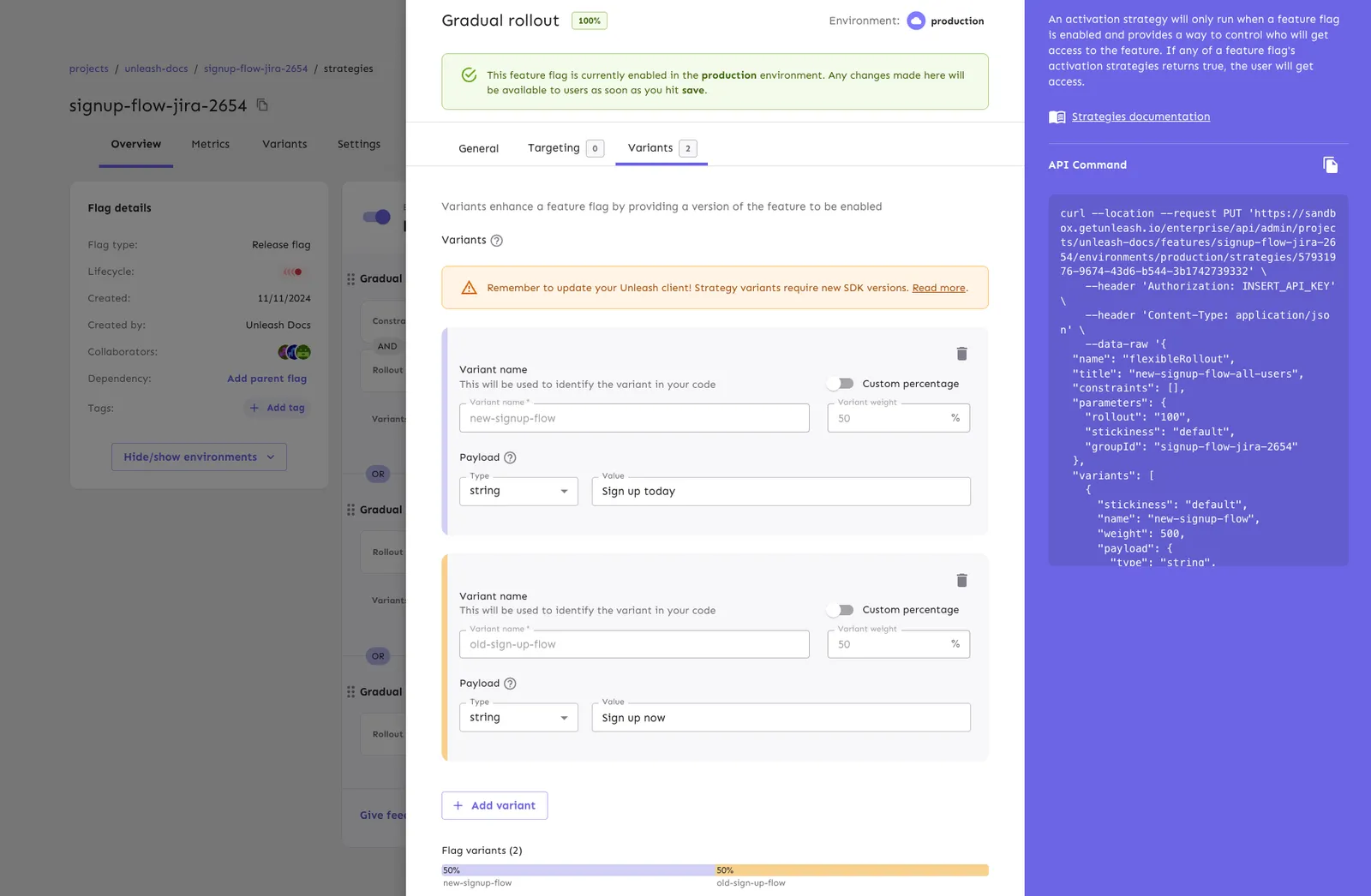
- Go to the Variants tab and click Add variant.
- Enter the variant name and an optional payload.
- Optionally, click Add variant again to add more variants.
- Toggle Custom percentage for fixed weights, if required.
- Click Save strategy.
Fallback variant
If no variant matches in the given context or if the flag is disabled, Unleash returns a fallback variant:
Activation strategy order
Unleash evaluates activation strategies in order. Therefore, when using multiple activation strategies with variants, define your most restrictive activation strategy first, followed by gradually broader activation strategies.
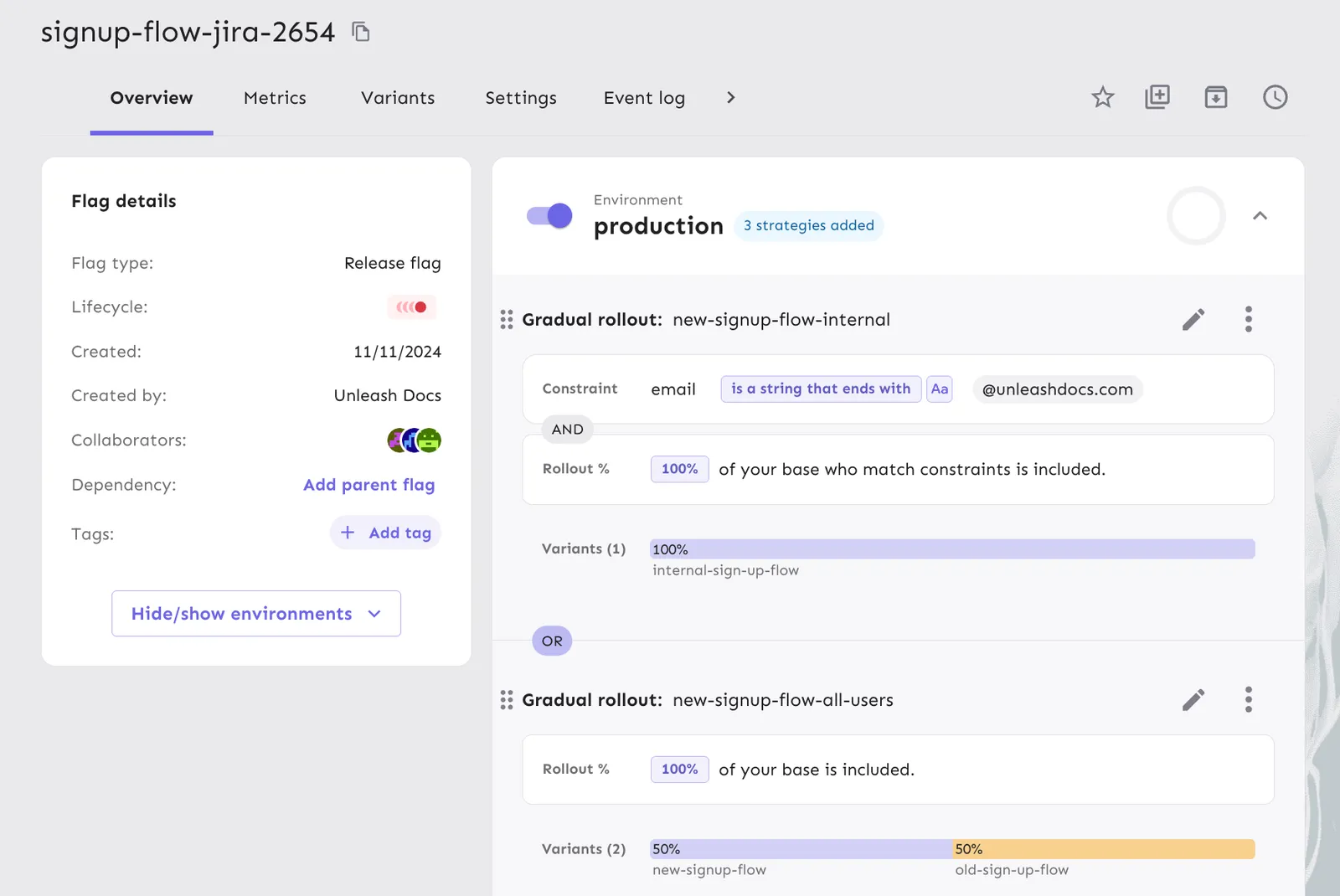
In the following example, we defined a new checkout flow with two activation strategies: one for internal users matching the company email address, and one for all users. We start by defining the internal activation strategy first, as it is more restrictive.
For this strategy, we defined a variant called internal-sign-up-flow that returns the string ‘Sign up internally’ in the payload. For the second strategy, we defined two variants: new-sign-up-flow and old-sign-up-flow, that return ‘Sign up now’ and ‘Sign up today’ strings respectively.
By defining the more restrictive strategy first, we ensure that all internal users get the ‘Sign up internally’ message, while all other users get a 50-50 split between the ‘Sign up now’ and ‘Sign up today’ versions.
Client SDK support
Strategy variants require Unleash 5.4 or later. For the minimum version of each backend SDK, see the SDK compatibility table.
Backend SDKs evaluate strategy variants locally. If an SDK version predates strategy variant support, it does not evaluate them and returns the fallback variant.
Frontend SDKs receive variants that the Unleash server, Unleash Edge, or the Frontend API has already evaluated, so they work with strategy variants without evaluating them locally.
Environment-level variants
Environment-level variants are deprecated. Use strategy variants instead.